
BBSpoiler

BBSpoiler

توسط

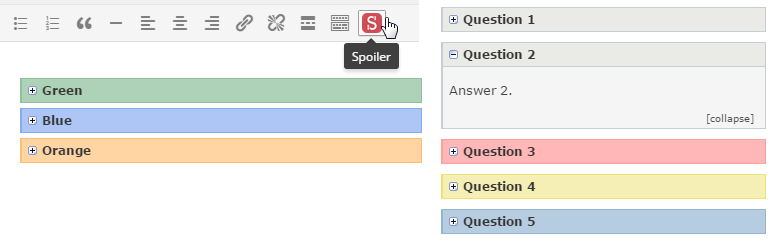
You can use this plugin to hide part of the text of a post in a nicely-formatted container that will becomes unhidden when clicked on. The plugin can be useful for creating FAQ pages, hiding large pictures, and things like that.

The plugin creates its own “Spoiler” button in the visual editor, but you can also add spoilers directly using tags. For example:

[spoiler title='Title']Spoiler content[/spoiler]

or

[spoiler title='Title' collapse_link='no']Spoiler content[/spoiler]

If you liked my plugin, please rate it.

  1. Upload bbspoiler folder to the /wp-content/plugins/ directory.
  2. Activate the plugin through the Plugins menu in WordPress.
  3. That’s all.

You can find the “Spoiler” plugin button in the visual editor.

سوالات متداول

How do I indent paragraphs in spoiler text?

This spoiler code gives you three paragraphs of text:

[spoiler title='Title' collapse_link='true']First Paragraph

Second Paragraph

Third Paragraph[/spoiler]

Can I use spoilers within spoilers?

Yes, but only up to two levels. Use the number 2 in the shortcode.
The code should look like this:

[spoiler title='Parent']

[spoiler2 title='Child 1']text[/spoiler2]
[spoiler2 title='Child 2']text[/spoiler2]

[/spoiler]

Does the plugin support localization?

Yes, please use translate.wordpress.org.

×
نظری برای این آیتم موجود نیست.
0 0 رای ها
امتیازدهی
اشتراک در
اطلاع از
0 نظرات
قدیمی‌ترین
تازه‌ترین بیشترین رأی
بازخورد (Feedback) های اینلاین
مشاهده همه دیدگاه ها
نسخه حجم فایل SHA256 تغییرات دانلود
2.02 10 کیلوبایت -
دانلود
×
★★★★★
★★★★★
4.7 /5 (29 نظر)

قیمت:

رایگان

نگارش

2.02

آخرین انتشار

12 اردیبهشت 1405

آخرین بروزرسانی

2 ماه پیش

نصب های فعال

4,000+

نگارش وردپرس

وردپرس 3.9+

تست شده از نسخه

وردپرس 6.8.5

نگارش PHP

-

نسخه ها

1 نسخه




