

Alex Reservations is an easy-to-use WordPress restaurant reservations platform plugin.
It will streamline your entire booking process and will save time for both the restaurant and the customer.
Key Features
- Efficient management of daily reservations for single or multiple locations
- Interactive dashboard with floor plan, monthly, weekly, and timeline views
- Create multiple schedules with customizable availability
- Customizable booking widget for your website
- Special event organization (Mother’s Day, wine tastings, themed nights)
- Automated and customizable email system
- Reminders to reduce customer no-shows
- Culinary and seating preference options for customers
- Integrated CRM for tagging and exporting customer data
- Multi-site environment compatibility for SAAS solutions
Benefits of Alex Reservations
- Workflow Optimization: Manage all your reservations from a single intuitive dashboard.
- Enhanced Customer Experience: Offer diners the ability to customize their bookings.
- Reduced No-Shows: Automatic reminder system to maximize attendance.
- Data Analytics: Gain valuable insights about your customers to improve your marketing.
- Scalability: Perfect for single restaurants or multi-location chains.
- Increased Revenue: Maximize table utilization and minimize empty seats.
- Brand Consistency: Customizable emails and widget to match your restaurant’s branding.
- Time-Saving: Automate repetitive tasks and focus on providing great dining experiences.
Who Can Benefit?
- Independent Restaurants
- Restaurant Chains
- Fine Dining Establishments
- Cafes and Bistros
- Event Spaces
- Restaurant Management Companies
- SAAS Providers for the Restaurant Industry
Elevate your restaurant’s booking system with Alex Reservations. From small cafes to large chains, our plugin adapts to your needs, providing a seamless reservation experience for both staff and customers. Say goodbye to booking headaches and hello to efficient, customer-focused reservation management.
Try Alex Reservations today and transform the way you handle bookings!
Features included with the Alex Reservations Free Edition for restaurant reservations:
- Limited Bookings – Receive and manage reservations from your venue.
- Bookings List View — Manage the daily list of reservations and create/update them from the same list. Filter them by customer, tags or status.
- Monthly View — General view of monthly reservations. Add or update reservations directly in the view.
- Weekly View — Jump from the monthly view to the weekly view. Show a list of daily reservations per column/day.
- Customers List View — Easy CRM solution for customers. Filter them by tags, last reservation or number of reservations.
- Custom Tags — Create tags for managing bookings and use them for filtering. Tag customers to know their wine preferences, identify VIP customers or know their food alergies.
- Manage Shifts — Create multiple shifts for breakfast, lunch or dinner.
- Email Templates — Customer your notifications to customers.
- Custom Widget — Multi language front widget. Mobile friendly. Customize colors and the input fields required to the customer.
Features included with the Alex Reservations PLUS Edition for restaurant reservations:
- Unlimited Bookings – Receive and manage unlimited reservations across all your venues.
- Multiple Restaurants — Centralized management with custom dashboards for each restaurant.
- User Roles & Multiple Users — Granular access control with different permissions for each user across restaurants.
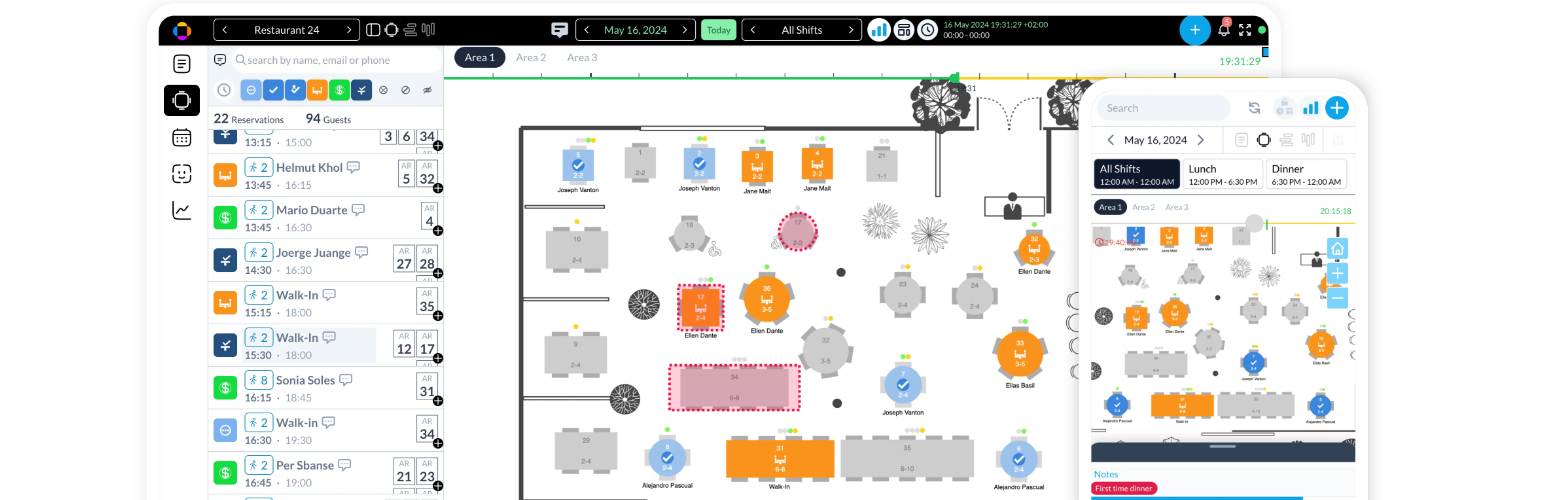
- Mobile Interface – Responsive design for managing bookings and customers on-the-go.
- Floor Plan View — Intuitive visual management of tables, reservations, and wait lists.
- Tables Editor — Powerful drag-and-drop floor plan builder to create and customize restaurant layouts.
- Print your floor plan per shifts – Generate shift-specific floor plans for staff guidance.
- 360 Panorama Reservation – Immersive 360-degree views for customers to choose their preferred seating.
- Timeline Views
- Horizontal Timeline – Clear overview of daily reservations at a glance.
- Vertical Timeline – Chronological list view for quick reservation management.
- Global Timeline – Comprehensive view of all reservations with assigned tables.
- Advanced Reservation Features
- Area/Table Selection – Let customers choose their preferred seating.
- Manage shared tables – Optimize space with communal seating options.
- Close days and slots – Flexible control over availability.
- Customer Communication
- Email & SMS reminders – Automated booking reminders to reduce no-shows.
- Email notifications – Comprehensive system for staff and customer alerts.
- Email Logo – Branded emails with custom headers and footers.
- Customers Reviews – Automated review requests post-dining.
- Payments – Integrated processing with Stripe, PayPal, and more for deposits or full payments.
- Manage Events — Create and manage special events like Mother’s Day, Christmas, etc.
- Multiple Widgets — Customizable booking widgets for different scenarios.
- Reporting & Analytics
- Comprehensive Reports – Insights on bookings, customers, and reviews.
- Export Bookings & Customers – Easy data extraction in CSV and PDF formats.
- Multilingual Support
- Translated to 23 languages – Out-of-the-box support for global clientele.
- Custom translations – Fully editable text for perfect localization.
- User Experience Enhancements
- Dark mode – Modern, eye-friendly interface option.
Getting Started with the Alex Restaurant Reservations plugin is Easy
Use the built-in Setup Wizard to create your first Restaurant in under 5 minutes.
Next, just embed the reservations widget on your site using the widget shortcode [rr_form id='__' button='Book now'].
Who This Reservation System is For
- Single restaurants — Restaurant owners can use this system for managing their reservations and tables.
- Multiple restaurants — Manage from one dashboard several locations.
- WordPress agencies — Create your own SAAS platform for reservations managing many restaurants.






