
Display During Conditional Shortcode

Display During Conditional Shortcode

توسط

Display content conditionally based on a schedule. Choose from three scheduling modes:

  1. Date Range – Show content between specific start and end dates
  2. Recurring – Show content on specific days of the week during a time window
  3. Custom – Use PHP strtotime expressions for flexible scheduling

Gutenberg Block

The Display During block provides a visual editor with:

  • Sidebar controls for all three scheduling modes
  • Date/time pickers for start and end dates
  • Day-of-week checkboxes for recurring schedules
  • Live status indicator (active/inactive)
  • Optional fallback message when content is hidden
  • Copy as Shortcode toolbar button

Shortcodes

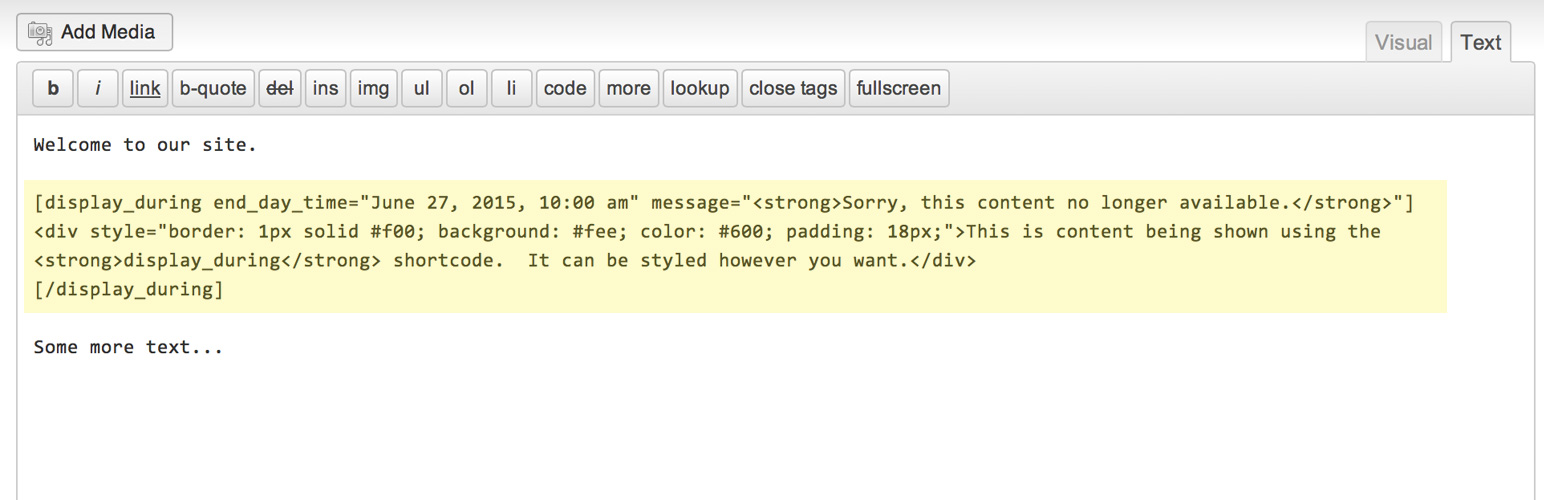
The [display_during] shortcode works in the Classic Editor and anywhere shortcodes are supported.

Date range:
[display_during start_day_time=”June 1, 2026 8:00 am” end_day_time=”December 31, 2026 11:59 pm”]Content here[/display_during]

Recurring schedule (new in 2.0):
[display_during days=”mon,wed,fri” start_time=”09:00″ end_time=”17:00″]Office hours content[/display_during]

Custom strtotime:
[display_during start_day_time=”Sun 8:00 am” end_day_time=”Mon 8:00 pm”]Weekend content[/display_during]

With fallback message:
[display_during end_day_time=”June 1, 2026″]Register now![display_during_message]Registration has closed.[/display_during_message][/display_during]

Shortcode Parameters

  • start_day_time – When to start showing content (strtotime string or date)
  • end_day_time – When to stop showing content
  • days – Comma-separated days for recurring mode (mon,tue,wed,thu,fri,sat,sun)
  • start_time – Start time for recurring mode (HH:MM format)
  • end_time – End time for recurring mode (HH:MM format)
  • timezone_location – PHP timezone identifier (defaults to site timezone)
  • message – Plain text fallback message (legacy; use nested shortcode for rich content)

Install via Plugins > Install New

  1. Search for “Display During Conditional Shortcode”
  2. Click the “Install Now” link
  3. Click “Activate Plugin”

Via ZIP / FTP

  1. Unzip the ZIP file and drop the folder straight into your wp-content/plugins directory.
  2. Activate the plugin through the ‘Plugins’ menu in WordPress.

Using the Block Editor

  1. Add a new block and search for “Display During”
  2. Configure the schedule in the sidebar
  3. Add content to the Content zone
  4. Optionally enable and add a fallback message

Using the Shortcode

  1. Insert [display_during end_day_time="June 27, 2026 10:00 am"]Your content[/display_during]
  2. Publish and view the post or page

سوالات متداول

How do I show content on a recurring schedule?

Use the Recurring mode in the block sidebar, or the shortcode days parameter:

[display_during days="mon,wed,fri" start_time="09:00" end_time="17:00"]Weekday content[/display_during]

What are valid time settings for start_day_time and end_day_time?

The plugin uses PHP’s strtotime() function. You can specify a specific date (e.g. “June 27, 2026 10:00 am”) or a relative expression (e.g. “Sun 8:00 am”, “Today 9am”).

Either start_day_time or end_day_time (or both) must be provided. If start_day_time is omitted, “now” is used. If end_day_time is omitted, content is shown permanently after the start time.

Can I show content only after a certain date?

Yes! Use start_day_time without end_day_time:
[display_during start_day_time=”June 1, 2026 8:00 am” message=”Coming soon!”]Content[/display_during]

Can I show rich fallback content instead of plain text?

Yes! Use the nested [display_during_message] shortcode:
[display_during end_day_time=”June 1, 2026″]Main content[display_during_message]Sorry, this is no longer available.[/display_during_message][/display_during]

In the block editor, check “Show optional message when not displayed” to reveal the message zone.

Does the block work with the Classic Editor?

Yes. The block saves a real shortcode in the post content, so it round-trips cleanly between the Block Editor and Classic Editor.

Can I convert existing shortcodes to blocks?

Yes. The plugin includes a shortcode-to-block transform. Existing [display_during] shortcodes can be converted using the “Convert to Blocks” feature.

Is support available?

Yes, use the contact form on the ShareThePractice.org website.

×
نظری برای این آیتم موجود نیست.
0 0 رای ها
امتیازدهی
اشتراک در
اطلاع از
0 نظرات
قدیمی‌ترین
تازه‌ترین بیشترین رأی
بازخورد (Feedback) های اینلاین
مشاهده همه دیدگاه ها
نسخه حجم فایل SHA256 تغییرات دانلود
2.0 29 کیلوبایت -
دانلود
×
★★★★★
★★★★★
5.0 /5 (3 نظر)

قیمت:

رایگان

نگارش

2.0

آخرین انتشار

21 اردیبهشت 1405

آخرین بروزرسانی

1 ماه پیش

نصب های فعال

200+

نگارش وردپرس

وردپرس 6.1+

تست شده از نسخه

وردپرس 6.9.4

نگارش PHP

PHP 7.0+

نسخه ها

1 نسخه




