
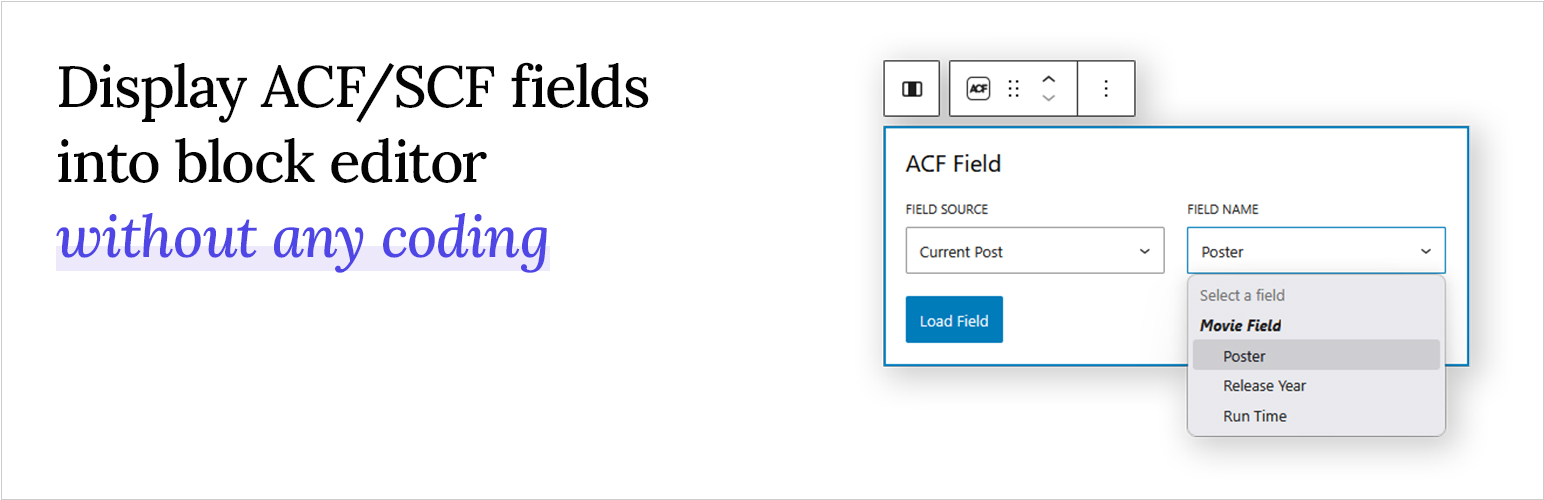

Blocks for ACF Fields lets you effortlessly load and display Advanced Custom Fields (ACF) or Secure Custom Fields (SCF) inside the WordPress block editor using a single, flexible block. Whether you’re dealing with text, images, URLs, or complex field types, this plugin makes it simple — all without writing a single line of code.
How to Use it
Just create your custom fields with the ACF or SCF plugin, then open the WordPress block editor. Add the “ACF Field” block to your page or template, select the field you want to display from the dropdown, and you are done! Your custom field will now appear right inside the editor, exactly where you want it.
Want to see it in action? Watch the short demo video below to learn how it works in real time.
Features
- No Code Needed – Display your ACF & SCF fields directly in the editor without building a custom block.
- One Block for All Fields – Load almost any field type using just a single, versatile block.
- Smart Field Picker – No need to type field names. Choose from a dropdown that automatically shows only the ACF & SCF fields available for the post, page, or template you’re editing.
- Flexible Output Control – Style and format your field values directly in the editor, with output that always works correctly regardless of the field’s return setting.
- Supports Most ACF/SCF Field Types – Including Text, Image, Post Object, Taxonomy, User, and more.
- Supports All Field Locations – Works with post fields, options pages, term fields, and user fields.
- Full Site Editing Ready – Fully compatible with the WordPress Site Editor for building custom templates and theme parts.
- Dynamic Layouts Ready – Seamlessly works inside Query Loops and reusable patterns for dynamic layouts.
In addition to choosing which field to display, you also have control over how it appears. Text-based fields (including multiple-value fields like Select or Checkbox) can be shown as plain text or formatted with typography options. Image fields can be displayed as actual images with the same styling options as core Image blocks. For URL-return fields (such as Link or Post Object), you can render them as clickable buttons that automatically match your theme’s design.
With this flexibility, the plugin supports most commonly used field types right out of the box. Here’s the full list of supported fields:
- Text
- Text Area
- Number
- Range
- URL
- Password
- Image
- File
- WYSIWYG Editor
- oEmbed
- Select
- Checkbox
- Radio Button
- Button Group
- True/False
- Link
- Post Object
- Page Link
- Relationship
- Taxonomy
- User
- Google Map
- Icon Picker
- Date Picker
- Date Time Picker
- Time Picker
- Color Picker
In addition to the wide variety of field types, you also have control over where your fields are sourced from. This makes it easy to connect content dynamically based on the template you’re editing.
- Post (any post type) – Load fields attached to the post you’re currently editing, whether it’s a post, page, or any custom post type.
- Option – Pull global option fields, perfect for site-wide settings like logos, contact info, or social links.
- User – Display fields attached to a user profile. Available when editing author templates, making it easy to showcase author bios, avatars, or custom user data.
- Taxonomy – Load fields attached to taxonomy terms. Available when editing term archive templates, ideal for creating custom category, tag, or taxonomy layouts.
Full documentation and usage guides are available at:
https://www.acffieldblocks.com/documentation/
PRO Version – Unlock Advanced Field Support
Upgrade to the PRO version to extend your layouts even further with advanced field types. PRO not only adds support for complex field types but also introduces more advanced output options, giving you full control over how your content is displayed.
Additional supported field types in PRO:
- Repeater – Easily transform your repeater fields into repeatable content sections inside the block editor. Each sub field can be accessed and styled individually, giving you full flexibility to match your layout needs. Display them as lists, grids, carousels, accordions, or tabs.
- Gallery – Display your gallery fields as an image grid, masonry layout, or interactive carousel. Fine-tune responsive layouts with options for different screen sizes, and choose whether images open in a lightbox or link to the full-size version for an engaging user experience.
- Group – Easily access and display sub fields inside group fields, no matter how deeply nested.
The PRO version doesn’t just add support for new field types, it also unlocks powerful new display options for fields already supported in the free plugin. These options let you loop through related content and build dynamic layouts directly in the block editor.
- Post Object & Relationship – Display these fields as dynamic post loops (List, Grid, or Carousel), similar to the Query Loop block, with the added ability to load custom fields within each post. Also supports Single Post display. Perfect for creating related posts sections or featured post displays.
- Taxonomy – Render taxonomy fields as term loops (List, Grid, or Carousel), with the ability to access and display custom fields attached to each term. Also supports Single Term display. Ideal for flexible category, tag, or custom taxonomy layouts.
- User – Display user fields as user loops (List, Grid, or Carousel), complete with ability to show custom fields attached to each user. Also supports Single User display. Great for building user directories, contributor listings, or team layouts.
- Google Map – Display ACF Google Maps fields with custom markers and styling. Perfect for location-based content like store locators, event venues, or property listings.
- Embed Popup – Display an ACF oEmbed or URL field inside a lightbox popup. The embed is only loaded on click, keeping your pages fast while providing rich media experiences.
Block Visibility by ACF
Blocks for ACF Fields PRO lets you control when a block is displayed, based on the value of an ACF or SCF field. This makes it easy to build smarter layouts without relying on custom PHP conditions or theme logic. Because visibility is handled at the block level, this works seamlessly across the block editor, site editor, templates, and patterns.
From simple field displays to advanced, dynamic layouts, Blocks for ACF Fields gives you full control over how your content appears in the block editor. Start with the free version, and unlock even more powerful options with PRO when you’re ready to take your layouts further.






