
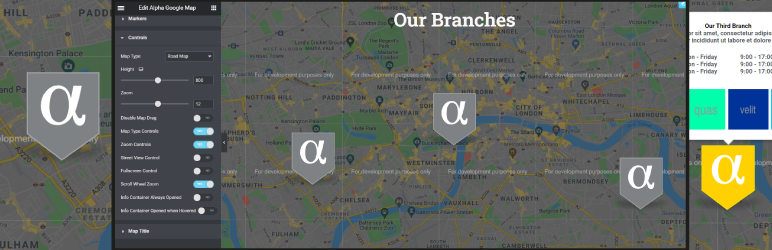
Alpha Google Map For Elementor

Alpha Google Map For Elementor

توسط

This plugin provides essential Google Maps functionalities with additional premium features tailored for Elementor.

Plugin Features:

  • Custom map pins with hover and active states
  • Customizable info-box with image gallery support
  • Extensive map controls
  • Optional Map ID (Cloud Styling) support with a locale-aware Google Maps loader
  • Responsive live editing within Elementor
  • Compatibility with the latest Google Maps API standards

Demo:

Check out the plugin demo here.

Contributing and Reporting Bugs:

Contribute on GitHub: Alpha-Google-Map-For-Elementor

Support:

For community support, use the WordPress.org forums. Report bugs on GitHub Issues.

Minimum Requirements:

  • WordPress 6.0 or greater
  • PHP version 7.4 or greater
  • MySQL version 5.0 or greater

Recommended:

  • PHP version 8.1 or greater
  • MySQL version 5.6 or greater
  • WordPress Memory limit of 128 MB or higher

Installation Steps:

  1. Ensure Elementor Website Builder is installed and activated.
  2. Navigate to Plugins > Add New in your WordPress dashboard.
  3. Search for ‘Alpha Google Map For Elementor’.
  4. Install and activate the plugin.

Manual Installation:

  1. Upload the ‘alpha-google-map-for-elementor’ folder to /wp-content/plugins/.
  2. Activate the plugin via the ‘Plugins’ screen in WordPress.

سوالات متداول

Can I use Alpha Google Map For Elementor as a stand-alone plugin?

No. Elementor Website Builder must be installed and activated.

×
نظری برای این آیتم موجود نیست.
0 0 رای ها
امتیازدهی
اشتراک در
اطلاع از
0 نظرات
قدیمی‌ترین
تازه‌ترین بیشترین رأی
بازخورد (Feedback) های اینلاین
مشاهده همه دیدگاه ها
هیچ نسخه‌ای برای این آیتم موجود نیست.
★★★★★
★★★★★
5.0 /5 (1 نظر)

قیمت:

رایگان

نگارش

آخرین انتشار

24 اردیبهشت 1405

آخرین بروزرسانی

1 ماه پیش

نصب های فعال

200+

نگارش وردپرس

وردپرس 6.0+

تست شده از نسخه

وردپرس 6.9.4

نگارش PHP

PHP 7.4+

نسخه ها

0 نسخه




