
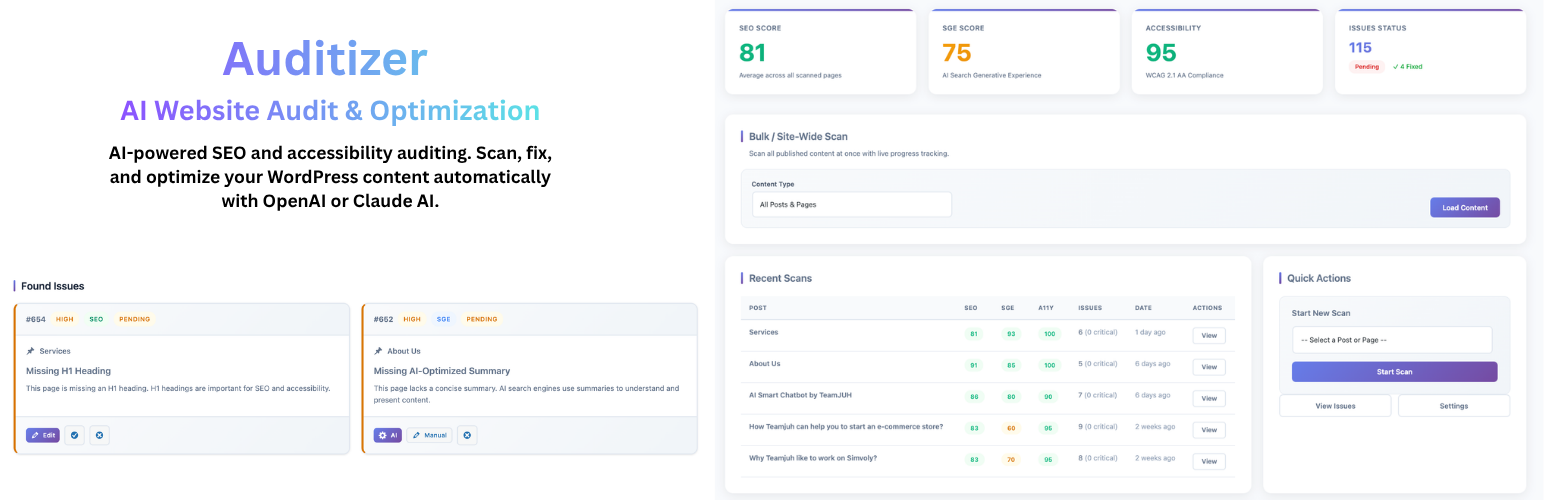
Auditizer – AI Website Audit & Optimization

Auditizer – AI Website Audit & Optimization

توسط

Auditizer gives you professional-grade SEO and accessibility auditing powered by artificial intelligence. Scan your entire WordPress site, identify critical issues, and apply AI-generated fixes automatically — all with full backup and one-click rollback protection.

Perfect for content creators, agencies, and businesses that want to improve search rankings and web accessibility without hiring expensive consultants.

🚀 Core Features

  • AI-Powered Fixes – Generate intelligent fix suggestions using OpenAI GPT-4 or Anthropic Claude
  • Bulk Site Scanning – Scan all posts and pages at once with live progress tracking
  • Automatic Backups – Every fix creates a full backup with one-click rollback
  • Advanced Filtering – Filter by status, severity, category, and auto-fixable issues
  • Training Mode – Teach the AI your brand voice and writing style
  • Cost Tracking – Monitor AI usage and costs over the last 30 days
  • Export Reports – Download issues as CSV for client reporting

📊 What Gets Scanned

SEO Issues:
* Missing or duplicate meta titles and descriptions
* H1 tag problems (missing, duplicate, or mismatched)
* Thin content detection
* Image alt text optimization
* Broken internal links
* Keyword density and placement
* Open Graph and Twitter Card tags
* Canonical URL issues
* Schema markup detection

SGE (AI Search Optimization):
* Content structure for AI search engines
* Direct answer formatting
* Topic authority signals
* FAQ and Q&A detection
* Entity coverage and relevance
* Content freshness indicators

Accessibility (WCAG 2.1):
* Missing or empty alt attributes
* Color contrast compliance (AA standard)
* Form label associations
* ARIA landmarks and roles
* Keyboard navigation support
* Heading hierarchy validation
* Document language attributes

🎯 How It Works

  1. Run a Scan – Use bulk scan from the dashboard or scan individual posts
  2. Review Issues – See all detected problems with severity ratings and descriptions
  3. Get AI Fixes – Click “Get AI Fix” to generate intelligent solutions
  4. Apply Automatically – One-click to apply fixes with automatic backup
  5. Rollback if Needed – Restore original content instantly from any backup

🔒 Privacy & Security

  • Only post content is sent to AI providers for fix generation
  • No personal data, usernames, or emails are transmitted
  • API keys stored securely in WordPress database
  • All database operations use prepared statements
  • Nonce verification on all actions
  • Capability checks enforce proper permissions

🔧 Page Builder Compatibility

Works seamlessly with:
* Gutenberg (Block Editor)
* Classic Editor
* Elementor
* Divi Builder
* Beaver Builder
* Bricks Builder
* WPBakery
* Any builder using standard post content storage

💡 Use Cases

  • Bloggers – Improve SEO scores and reader accessibility
  • Agencies – Audit client sites and generate fix reports
  • E-commerce – Optimize product pages for better rankings
  • Publishers – Maintain content quality across large sites
  • Developers – Add professional auditing to client deliverables

External Services

This plugin connects to third-party AI services to generate content improvements. Connections only occur when you configure an API key and explicitly trigger a scan or fix.

OpenAI API

  • Purpose: Generate SEO and accessibility fix suggestions
  • Data Sent: Post content, meta fields, issue context
  • Service: https://platform.openai.com/
  • Terms: https://openai.com/policies/terms-of-use
  • Privacy: https://openai.com/policies/privacy-policy

Anthropic Claude API

  • Purpose: Generate SEO and accessibility fix suggestions
  • Data Sent: Post content, meta fields, issue context
  • Service: https://www.anthropic.com/
  • Terms: https://www.anthropic.com/legal/consumer-terms
  • Privacy: https://www.anthropic.com/legal/privacy

No personal user data (usernames, emails, passwords) is ever transmitted to these services.

Support

For support, feature requests, or bug reports:

  • WordPress.org Forum: https://wordpress.org/support/plugin/auditizer/
  • Documentation: https://teamjuh.com/auditizer-docs/
  • Website: https://teamjuh.com

Credits

Developed by TeamJUH – WordPress development and AI integration specialists.

Automatic Installation

  1. Log in to your WordPress admin panel
  2. Navigate to Plugins > Add New
  3. Search for “Auditizer”
  4. Click Install Now and then Activate

Manual Installation

  1. Download the plugin zip file
  2. Go to Plugins > Add New > Upload Plugin
  3. Choose the zip file and click Install Now
  4. Click Activate Plugin

Configuration

  1. Go to Auditizer > Settings
  2. Choose your AI provider (OpenAI or Anthropic)
  3. Enter your API key
  4. Configure scan preferences
  5. Visit Auditizer > Dashboard to run your first scan

Getting an API Key

For OpenAI:
Visit https://platform.openai.com/api-keys and create a new API key. GPT-4 or GPT-4o recommended.

For Anthropic Claude:
Visit https://console.anthropic.com/ and generate an API key. Claude Sonnet or Opus models supported.

سوالات متداول

Do I need an AI API key?

No. Scanning and issue detection work without an API key. You’ll see all problems, severities, and descriptions. AI-powered fix suggestions and auto-fix require an API key from OpenAI or Anthropic.

Which AI provider should I choose?

Both OpenAI (GPT-4) and Anthropic (Claude) produce excellent results. Claude tends to be slightly more cost-effective for large volumes. Try both and see which fits your workflow and budget.

Is my content safe?

Yes. Only the text content of posts/pages is sent to the AI provider to generate fixes. No user data, passwords, emails, or WordPress credentials are ever transmitted. All data is sent over encrypted HTTPS connections.

Can I undo automatic fixes?

Absolutely. Every auto-fix creates a complete backup including post content, title, excerpt, and all meta fields. Click Rollback on any fixed issue to restore the original instantly.

How much do AI fixes cost?

Costs vary by provider and content length. OpenAI GPT-4 costs approximately $0.03 per 1,000 tokens. Claude costs approximately $0.015 per 1,000 tokens. The Usage page tracks your spending over 30 days. A typical fix costs $0.01-0.05.

Can I scan my entire site?

Yes. The Dashboard has a Bulk Scan feature that scans all published posts and pages. A progress bar shows real-time status. Large sites (100+ posts) may take several minutes.

What severity levels exist?

Issues are rated as Critical, High, Medium, or Low. Critical issues severely impact SEO or accessibility. Low issues are minor optimizations. Focus on Critical and High issues first for maximum impact.

Does this work with Elementor/Divi?

Yes. Auditizer reads the final rendered content, so it works with any page builder that stores content in WordPress’s standard post content field. Elementor, Divi, Beaver Builder, Bricks, and WPBakery are all supported.

Can I train the AI?

Yes. Go to Auditizer > Training and submit examples of your preferred writing style. The AI uses these examples as context when generating fixes, matching your brand voice and tone.

How do I filter issues?

The Issues page has multiple filters:
* Status tabs – Pending, Fixed, Ignored (with live counts)
* Severity dropdown – Critical, High, Medium, Low
* Category dropdown – SEO, SGE, Accessibility
* Post title search – Find issues by post name
* Auto-fixable checkbox – Show only AI-fixable issues

Active filters appear as dismissible chips above the table.

Can I export audit reports?

Yes. Click Export CSV on the Issues page to download a spreadsheet with all current issues (or filtered results). Includes post title, type, severity, category, status, and description.

Is multisite supported?

Not currently. Auditizer is designed for single WordPress installations. Multisite support may be added in a future release.

Where do I report bugs?

Please open a support thread in the WordPress.org plugin forum. We monitor it daily and respond quickly.

×
نظری برای این آیتم موجود نیست.
0 0 رای ها
امتیازدهی
اشتراک در
اطلاع از
0 نظرات
قدیمی‌ترین
تازه‌ترین بیشترین رأی
نسخه حجم فایل SHA256 تغییرات دانلود
1.5.6 166 کیلوبایت -
دانلود
×
★★★★★
★★★★★
5.0 /5 (1 نظر)

قیمت:

رایگان

نگارش

1.5.6

آخرین انتشار

18 اردیبهشت 1405

آخرین بروزرسانی

3 ماه پیش

نصب های فعال

40+

نگارش وردپرس

وردپرس 6.0+

تست شده از نسخه

وردپرس 6.9.4

نگارش PHP

PHP 7.4+

نسخه ها

1 نسخه




