
CF7 Views – Complete Entry Management for Contact Form 7

CF7 Views – Complete Entry Management for Contact Form 7

توسط

CF7 Views v3.1.7 now has inbuilt feature to saves your Contact Form entries.
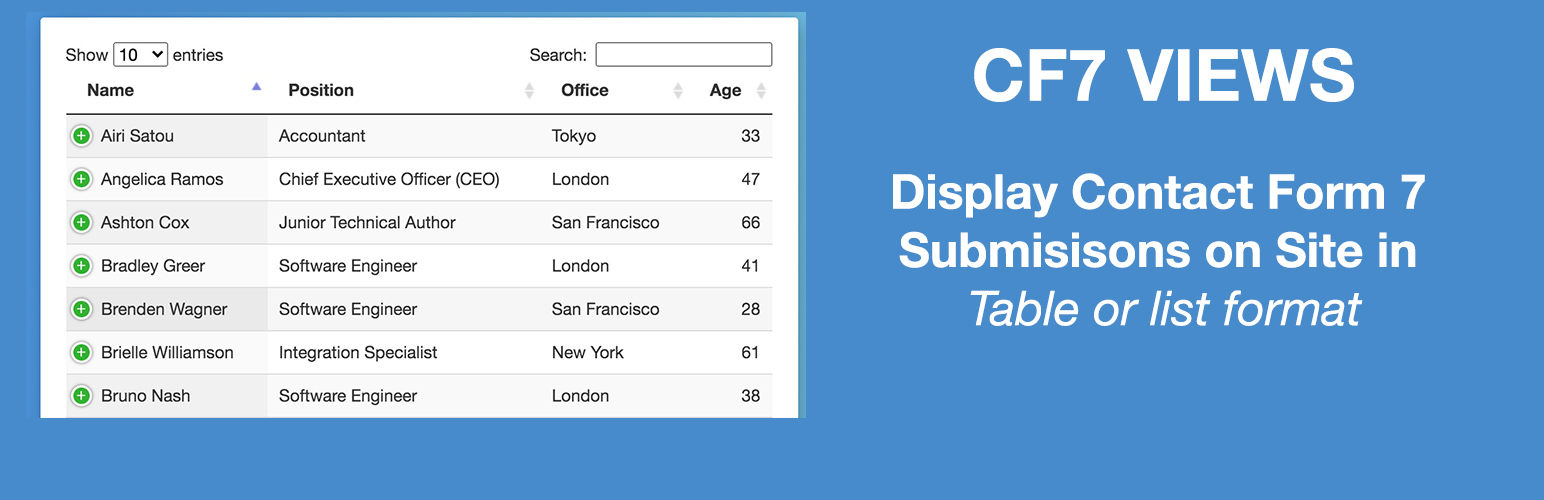
CF7 Views Views is an addon for Contact Form 7 that lets you to display Contact Form 7 submissions/entries in your site frontend using intuitive drag & drop View builder.
It shows submissions saved by Flamingo plugin
You need the Flamingo plugin installed to be able to use this plugin.
You can create Table View, List View or DataTable View.
It allows you add content before & after the View.
You can set number of submissions to display on page.

Top Features

  • Intuitive user interface!
  • Easy to use – drag and drop!
  • Option to set form fields to show in View.
  • Option to set custom labels for table columns.
  • Option to set number of submissions to show on page.
  • Add pagination before or after the table.
  • Display Pagination Information.

Get more features in Pro version
* Edit Entries.
* List View Format.
* DataTable View Format.
* Single Entry View – Display Contact Form 7 Forms Entry details on Single Page.
* Add Search Form above or at View bottom to filter/search submissions by field values.
* Filter submissions by field values.
* Display only User submitted Contact Form 7 Submissions.
* Display only Approved Contact Form 7 Submissions.
* Sort contact form 7 submissions via field values.
Get Contact Form 7 Views PRO!

Pro Features

List & DataTable View Format

Display Contact Form 7 Entries in a multicolumn layout on your site frontend. Display data using dataTables including features like responsive layout, print, pdf, csv download entries options.

Edit Contact Form 7 Entries

Edit Contact Form 7 Entries from site frontend within your view.

Delete Contact Form 7 Entries

Allow users to delete their submitted entries from the site frontend. Logged-in users can delete their entries, administrators can delete any entry.

Search Contact Form 7 Entries

Display Search Form in your View to allow users to filter view data by any field value. Options also include searching by Entry Submission Date or Date Range e.g. Display entries submitted between two dates.

Advanced Filters

Set Filters to Filter Entries before displaying on the site frontend by using any Form field value, logged-in user meta, custom dates, etc.
E.g. Display all entries where the user selected Male as Gender field value while submitting the form.

Advance Sorting

Sort by any Field value in Ascending or Descending order. Allows you to add multiple sort conditions.

Entries Approval

Display only those entries that are approved by admin from the backend.

Calculations

Display Contact Form 7 field total or average in the table footer column.

Custom HTML

Add custom HTML within View data. Supports shortcode

Checkout our other plugins
* Views for WPForms
Display WPForms Entries anywhere on your site in a table or list view
* Views for Ninja Forms
Display Ninja Forms Submissions anywhere on your site in a table or list view
* Gravity Forms Sendy Addon
Add user to Sendy using Gravity Forms.

To install Contact Form 7 Views, follow these steps:

  • Download and unzip the plugin
  • Upload the entire cf7-views/ directory to the /wp-content/plugins/ directory
  • Activate the plugin through the Plugins menu in WordPress

سوالات متداول

How to display Contact Form 7 submissions on your site frontend?
  • Download and unzip the plugin
  • Upload the entire cf7-views/ directory to the /wp-content/plugins/ directory.
  • Activate the plugin through the Plugins menu in WordPress.
  • Create New Contact Form 7 View from the Views menu in admin sidebar.
  • Save the View & copy the shortcode.
  • Use the shortcode to show it on page.
How do I install the plugin?

The plugin can be installed through the WordPress plugin repository or by uploading the plugin files to your website’s plugin directory. Once installed, the plugin can be activated and configured through the WordPress admin dashboard.

Can I filter Contact Form 7 submissions using any field value?

Yes in pro version you can set multiple filters based on filed values to display only those submissions which match the filter criteria.

Can I add csv export & print button to view?

Yes, It’s available as part of DataTables addon it includes the option to export form submissions to a CSV file, which can be useful for analyzing the data or importing it into other applications.

Can I control who can view the form submissions on the frontend?

Yes, the pro plugin includes options to restrict access to the form submissions only to logged in users. This allows website administrators to allow users to view only their submissions.

Can I limit the number of form submissions displayed on the frontend?

Yes, the plugin includes an option to limit the number of form submissions that are displayed on the frontend at a time and also includes pagination options to allow users to view additional submissions.

Can I customize the way form submissions are displayed on the frontend?

Yes, the plugin includes a variety of options for customizing the display of form submissions on the frontend, including the ability to choose which form fields are displayed, customize the layout and design of the submissions, and set up filters to only display specific submissions.

Can I display form submissions by date range?

Yes, the pro plugin includes options to filter form submissions by date range, this can be useful for displaying only submissions within a specific time frame.

Can I display Contact form submissions by certain fields?

Yes, the plugin includes options to filter form submissions by certain fields, this can be useful for displaying only submissions that contain specific information.

Can I display form submissions on multiple pages or posts?

Yes, the plugin allows you to display form submissions on multiple pages or posts by using shortcodes. You can also choose to display form submissions on specific pages or posts only.

Can I display form submissions in a specific order?

Yes, the plugin includes options to sort form submissions by different criteria such as submission date, form fields. This allows you to display the submissions in a specific order that makes sense for your website.

Can I display form submissions in different formats?

Yes, the plugin includes options to display form submissions in different formats such as a list, grid, or table. This allows you to choose the format that best suits your website’s design and layout.

Can I display form submissions with a search bar?

Yes, the plugin includes an option to include a search bar on the frontend. This allows users to search for specific form submissions based on certain criteria such as form fields or submission date.

Can I display form submissions with a pagination?

Yes, the plugin includes options to display form submissions with a pagination. This allows users to easily navigate through multiple pages of submissions.

Is there any restriction on how many views I can create?

No, you can create as many views as you like & use it anywhere on your site using shortcode.

×
نظری برای این آیتم موجود نیست.
0 0 رای ها
امتیازدهی
اشتراک در
اطلاع از
0 نظرات
قدیمی‌ترین
تازه‌ترین بیشترین رأی
نسخه حجم فایل SHA256 تغییرات دانلود
3.2.2 2 مگابایت -
دانلود
×
★★★★★
★★★★★
4.6 /5 (17 نظر)

قیمت:

رایگان

نگارش

3.2.2

آخرین انتشار

13 اردیبهشت 1405

آخرین بروزرسانی

4 ماه پیش

نصب های فعال

1,000+

نگارش وردپرس

وردپرس 5.0+

تست شده از نسخه

وردپرس 6.9.4

نگارش PHP

PHP 7.0+

نسخه ها

1 نسخه




