
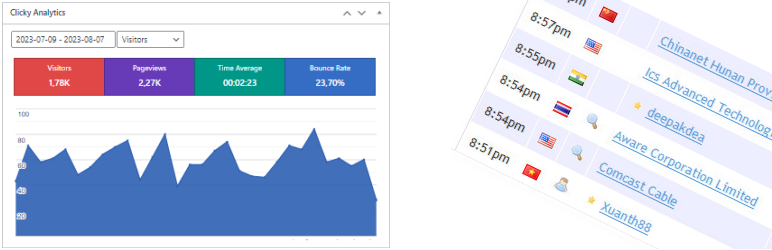

Using a widget, Clicky Analytics Plugin displays detailed info and stats about: online users, number of visits, number of actions, bounce rates, organic searches, time average directly on your Admin Dashboard.
This plugin automatically inserts Clicky Web Analytics cookieless tracking code in each page of your website.
Clicky Admin Dashboard features:
- you can access your website’s basic statistics in a widget on your Administration Dashboard
- cache feature, this improves loading speeds
- access level settings
- option to display top 30 pages, referrers and searches (sortable by columns)
- option to display Clicky Analytics statistics on frontend, at the end of each article
- has multilingual support, a POT file is available for translations.
Clicky Tracking features:
- cookieless tracking
- enable/disable Clicky Web Analytics tracking code
- user names tracking feature
- e-mails tracking feature
- video actions tracking for Youtube
- video actions tracking for HTML5
- asynchronously load of Clicky Web Analytics tracking code
User privacy oriented features (GDPR and other):
- IP address anonymization
- global opt-out feature
- tools to comply with GDPR requests from your visitors
- cookie-free/cookieless tracking
Clicky Custom Dashboard:
- all clicky stats are available in a custom dashboard, under your blog’s administration panel.
Some features like video analytics and custom data tracking will require a Clicky Analytics Pro account.
Further reading
- Search Engine Insights – The perfect tool for viewing Google Search Console stats in your WordPress dashboard.
- Analytics Insights – Connects Google Analytics with your WordPress site.
License
This plugin it’s released under the GPLv2, you can use it free of charge on your personal or commercial website.






