
Column Shortcodes

Column Shortcodes

توسط

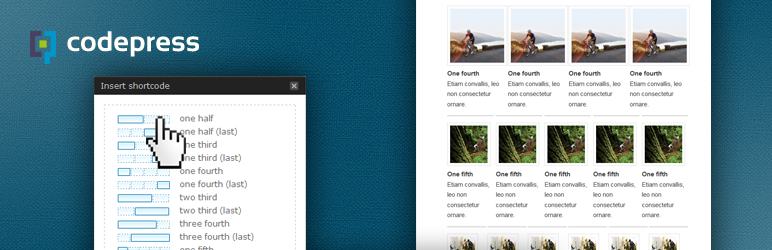
Adds shortcodes to easily create columns in your posts or pages.

Sometimes you just need to divide your page into different columns. With this plugin you just select a column shortcode and it will add the column to the page. You can also change the padding of each individual column from the UI.

There are 10 different column widths available from which you can make all combinations:

  • full width (1/1)
  • half (1/2)
  • one third (1/3)
  • two third (2/3)
  • one fourth (1/4)
  • three fourth (3/4)
  • one fifth (1/5)
  • two fifth (2/5)
  • three fifth (3/5)
  • four fifth (4/5)
  • one sixth (1/6)
  • five sixth (5/6)

A preset stylesheet is included, which you can also overwrite to you liking in your theme’s stylesheet.

Related Links:

  • http://www.codepresshq.com/
  1. Upload column-shortcodes to the /wp-content/plugins/ directory
  2. Activate Column Shortcodes through the ‘Plugins’ menu in WordPress
  3. A shortcode icon is added to the top of the WYSIWYG editor.
  4. Click the added icon and it will open a popup window from which you can pick your column shortcode.

سوالات متداول

How do I add a column shortcode?

Standard
The easiest way is to use the added icon on the top of your editor ( right next to the media icon ). This will open a popup window from which you can select a column icon by clicking on one of the shortcodes.

Manual
You could also type in the shortcode yourself inside the editor. The following shortcodes are available:

[full_width][/full_width]
[one_half][/one_half]
[one_half_last][/one_half_last]
[one_third][/one_third]
[one_third_last][/one_third_last]
[two_third][/two_third]
[two_third_last][/two_third_last]
[one_fourth][/one_fourth]
[one_fourth_last][/one_fourth_last]
[three_fourth][/three_fourth]
[three_fourth_last][/three_fourth_last]
[one_fifth][/one_fifth]
[one_fifth_last][/one_fifth_last]
[two_fifth][/two_fifth]
[two_fifth_last][/two_fifth_last]
[three_fifth][/three_fifth]
[three_fifth_last][/three_fifth_last]
[four_fifth][/four_fifth]
[four_fifth_last][/four_fifth_last]
[one_sixth][/one_sixth]
[one_sixth_last][/one_sixth_last]
[five_sixth][/five_sixth]
[five_sixth_last][/five_sixth_last]

Another option
Another way to add shortcodes is to switch to HTML-view. On the top of editor you will now see all the shortcodes listed.
By default these buttons are hidden. If you’d like to use them you can add this to your theme’s functions.php:

add_filter('add_shortcode_html_buttons', '__return_true' );

Where do I add my content?

When you have selected a shorcode it will be placed in you editor. You will see something like this:

[one_half][/one_half]

Make sure to place your content (text/images etc. ) between the two shortcodes, like so:

[one_half]My content goes here...[/one_half]

My existing theme uses the same shortcodes, how can I solve this?

You can prefix the shortcode by placing the following in your functions.php. Problem solved =)

add_filter( 'cpsh_prefix', 'set_shortcode_prefix' );
function set_shortcode_prefix() {
    return 'myprefix_'; // edit this part if needed
}

How can I hide the Padding Settings?

In patch 0.6 we added padding settings (optional) to the plugin. If you would like to hide this settings menu you can place the following in your functions.php

add_filter( 'cpsh_hide_padding_settings', '__return_true' );

How can I hide certain Column Shortcodes from the menu?

If you would like to hide certain column from the menu; place the following in your functions.php

function hide_column_shortcodes( $shortcodes ) {

    /* uncomment ( remove the '//' ) any of the following to remove it's shortcode from menu */

    // unset( $shortcodes['full_width'] );
    // unset( $shortcodes['one_half'] );
    // unset( $shortcodes['one_third'] );
    // unset( $shortcodes['one_fourth'] );
    // unset( $shortcodes['two_third'] );
    // unset( $shortcodes['three_fourth'] );
    // unset( $shortcodes['one_fifth'] );
    // unset( $shortcodes['two_fifth'] );
    // unset( $shortcodes['three_fifth'] );
    // unset( $shortcodes['four_fifth'] );
    // unset( $shortcodes['one_sixth'] );
    // unset( $shortcodes['five_sixth'] );

    return $shortcodes;
}
add_filter( 'cpsh_column_shortcodes', 'hide_column_shortcodes' );

How can I replace the default Shortcode CSS stylesheet?

You can easily overwrite the existing stylesheet. For example you would like to add a margin between your columns, you just place the following in your theme’s style.css:

.one_half {
    width: 49% !important;
    margin-right: 2% !important;
}
.one_half.last_column {
    width: 49% !important;
    margin-right: 0px !important;
}
.one_third {
    width: 32% !important;
    margin-right: 2% !important;
}
.one_third.last_column {
    width: 32% !important;
    margin-right: 0px !important;
}
.two_third {
    width: 66% !important;
    margin-right: 2% !important;
}
.two_third.last_column {
    width: 66% !important;
    margin-right: 0px !important;
}
.one_fourth {
    width: 23.5% !important;
    margin-right: 2% !important;
}
.one_fourth.last_column {
    width: 23.5% !important;
    margin-right: 0px !important;
}
.three_fourth {
    width: 74.5% !important;
    margin-right: 2% !important;
}
.three_fourth.last_column {
    width: 74.5% !important;
    margin-right: 0px !important;
}
.one_fifth {
    width: 18.4% !important;
    margin-right: 2% !important;
}
.one_fifth.last_column {
    width: 18.4% !important;
    margin-right: 0px !important;
}
.two_fifth {
    width: 39% !important;
    margin-right: 2% !important;
}
.two_fifth.last_column {
    width: 39% !important;
    margin-right: 0px !important;
}
.three_fifth {
    width: 59% !important;
    margin-right: 2% !important;
}
.three_fifth.last_column {
    width: 59% !important;
    margin-right: 0px !important;
}
.four_fifth {
    width: 79.6% !important;
    margin-right: 2% !important;
}
.four_fifth.last_column {
    width: 79.6% !important;
    margin-right: 0px !important;
}
.one_sixth {
    width: 15% !important;
    margin-right: 2% !important;
}
.one_sixth.last_column {
    width: 15% !important;
    margin-right: 0px !important;
}

How can I prevent the loading of the frontend styling

If you would like to prevent the loading of the column styling on the frontend; place the following in your functions.php

add_filter( 'cpsh_load_styles', '__return_false' );

Will you be adding more shortcodes?

We would love to hear your feedback and suggestions on this. Just send an email to info@codepress.nl.

How can I contribute a translation?

You will find a .po file in the languages folder which you can use. You can send the translation to info@codepress.nl.

×
نظری برای این آیتم موجود نیست.
0 0 رای ها
امتیازدهی
اشتراک در
اطلاع از
0 نظرات
قدیمی‌ترین
تازه‌ترین بیشترین رأی
هیچ نسخه‌ای برای این آیتم موجود نیست.
★★★★★
★★★★★
4.8 /5 (134 نظر)

قیمت:

رایگان

نگارش

آخرین انتشار

10 اردیبهشت 1405

آخرین بروزرسانی

3 ماه پیش

نصب های فعال

60,000+

نگارش وردپرس

وردپرس 4.8+

تست شده از نسخه

وردپرس 6.0.11

نگارش PHP

-

نسخه ها

0 نسخه




