
Custom Meta Widget

Custom Meta Widget

توسط

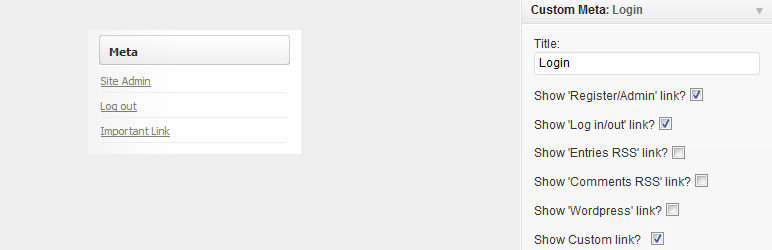
This plugin acts in exactly the same way as the standard Meta widget except that it adds options which allow you control which of the 5 standard Meta widget links should be displayed, with the additional option to add your own custom link.

The standard Meta widget that comes with WordPress offers no customization and requires you to show all 5 of the standard links (register, login, entries RSS, comments RSS, and WordPress.org, as well as any links added by themes or other plugins).

Translation Help

If you would like to help make this plugin available in your native language, please send your .po file to plugins@shinraholdings.com, and I will include it in the next version. The all the language files are in the lang subdirectory of the plugin.

Readme Generator

Support

Donations

Donations are graciously accepted to support the continued development and maintenance of this and other plugins. We currently accept PayPal, link backs, and kind words. Also, checking the ‘show plugin link’ option on the widget helps us out greatly!

  1. Download the latest zip file and extract the custom-meta-widget directory.
  2. Upload this directory inside your /wp-content/plugins/ directory.
  3. Activate the ‘Custom Meta Widget’ on the ‘Plugins’ menu in WordPress.
  4. Add the ‘Custom Meta’ widget to your sidebar (using the Appearance > Widgets menu) and choose which customizations you would like.

سوالات متداول

Installation Instructions

  1. Download the latest zip file and extract the custom-meta-widget directory.
  2. Upload this directory inside your /wp-content/plugins/ directory.
  3. Activate the ‘Custom Meta Widget’ on the ‘Plugins’ menu in WordPress.
  4. Add the ‘Custom Meta’ widget to your sidebar (using the Appearance > Widgets menu) and choose which customizations you would like.

Why does my Meta widget look the same?

This plugin does not modify the standard WordPress Meta widget. It is a completely separate widget titled ‘Custom Meta.’ If you are currently using the standard Meta widget, you will have to remove it from your sidebar and replace it with the Custom Meta widget using the Appearance > Widgets menu.

It also looks identical to the standard Meta Widget unless you opt to change which links are shown/hidden in the Appearance > Widgets menu, under the expanded ‘Custom Meta’ widget.

Which links can I hide/show?

You can remove any, all, or none of the links which appear on the standard Meta widget. You are also able to add a custom link to the list if you wish.

Why did you make this?

I didn’t like having the ‘Comments RSS’ link on the sidebar, but did like having the rest of them. I couldn’t find a plugin to do that and manually editing the code to accomplish this, while simple, is a dirty hack that breaks with every WordPress update, so I created a crude plugin to remove just the ‘Comments RSS’ link. I then cleaned this up and added an options page for all the links so that no one else would have to do this in the future.

Can you add this feature I just thought of?

Can I? Yes. Will I? Yes, if I think it would be a helpful addition. I’m trying to keep things clean and simple, but there’s always room for improvement, so let me know if you think a feature is lacking!

Will vanilla WordPress ever implement some variation of this?

I don’t know man. They haven’t yet, so it doesn’t look very likely. But I think they should and I would be glad if they did.

Why did you add an option to link to the plugin site, you horrible sellout?

Most people, myself included, are understandably reluctant to donate real currency for free stuff. However, putting a link to my site from your site is just as helpful and a much more comfortable and forthcoming mode of charity, especially in the webmaster community. Also, because I’m a horrible sellout.

×
نظری برای این آیتم موجود نیست.
0 0 رای ها
امتیازدهی
اشتراک در
اطلاع از
0 نظرات
قدیمی‌ترین
تازه‌ترین بیشترین رأی
نسخه حجم فایل SHA256 تغییرات دانلود
1.5.1 104 کیلوبایت -
دانلود
×
★★★★★
★★★★★
5.0 /5 (23 نظر)

قیمت:

رایگان

نگارش

1.5.1

آخرین انتشار

11 اردیبهشت 1405

آخرین بروزرسانی

4 ماه پیش

نصب های فعال

7,000+

نگارش وردپرس

وردپرس 2.8+

تست شده از نسخه

وردپرس 4.9.29

نگارش PHP

-

تگ ها

نسخه ها

1 نسخه




