
Show IDs by Echo

Show IDs by Echo

توسط

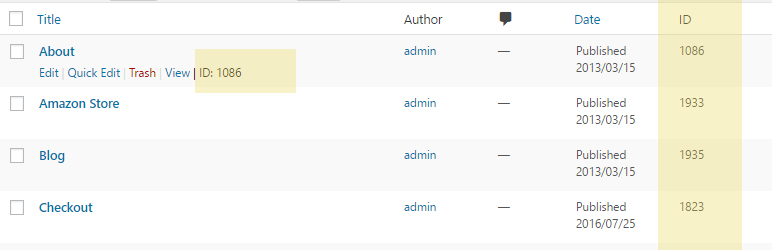
This plugin shows (reveals) IDs on admin screens that list posts, pages, custom post types and taxonomies, and others.

You can choose to display the ID in a new ‘ID’ column and/or under each row title after the ‘Edit | Quick Edit | View’ actions.

Features

  • Choose where to display IDs:

    • in a new ‘ID’ column
    • under each row title beside the ‘Edit | Quick Edit | View’ actions
  • Reveal IDs in the following lists:

    • Posts
    • Pages
    • Categories
    • Tags
    • Comments
    • Custom post types
    • Custom taxonomies
    • Users
    • Media

OUR FREE COMPLEMENTARY PLUGINS

Echo Knowledge Base is a documentation plugin for WordPress. Create knowledgebase, docs, FAQs, and wikis easily. Learn More

✅ The Help Dialog offers a chatbot-like dialog for better customer support and increased leads and sales. The Help Dialog includes FAQs, search, and a contact form. Learn More

Creative Add-Ons for Elementor helps you to write articles and documents faster and more easily using our powerful and practical Elementor widgets. Learn More

✅ The Content Down Arrow is coming soon.

You can install the ‘Show IDs by Echo plugins’ from your WordPress Dashboard or manually upload it through FTP.

OPTION 1: Install Plugin from WordPress Dashboard

  1. Navigate to Plugins -> Add New.
  2. Search for ‘Show IDs by Echo Plugins’ and install the plugin.
  3. Activate the plugin in the Plugins menu.
  4. Optional step: Go to Settings -> Show IDs to change where IDs will show.

OPTION 2: Manually Upload Plugin Files

  1. Download the plugin file from the plugin page: echo-show-ids.zip
  2. Unzip the file echo-show-ids.zip
  3. Upload the ‘show-ids’ folder to your ‘/wp-content/plugins’ directory (do not rename the folder)
  4. Optional: Go to Settings -> Show IDs to change where IDs will show.

سوالات متداول

Where can I submit question or support request?

Submit your inquiries here.

Does this plugin work for Posts, Pages, Categories, Custom Post Types and Taxonomies, Comments, Tags, Users or Media?

Yes, the plugin shows IDs for all these types in the WordPress admin section.

×
نظری برای این آیتم موجود نیست.
0 0 رای ها
امتیازدهی
اشتراک در
اطلاع از
0 نظرات
قدیمی‌ترین
تازه‌ترین بیشترین رأی
بازخورد (Feedback) های اینلاین
مشاهده همه دیدگاه ها
نسخه حجم فایل SHA256 تغییرات دانلود
1.3.2 181 کیلوبایت -
دانلود
×
★★★★★
★★★★★
5.0 /5 (1 نظر)

قیمت:

رایگان

نگارش

1.3.2

آخرین انتشار

12 اردیبهشت 1405

آخرین بروزرسانی

2 ماه پیش

نصب های فعال

2,000+

نگارش وردپرس

وردپرس 4.0+

تست شده از نسخه

وردپرس 6.9.4

نگارش PHP

PHP 5.5+

نسخه ها

1 نسخه




