
Equivalent Mobile Redirect

Equivalent Mobile Redirect

توسط

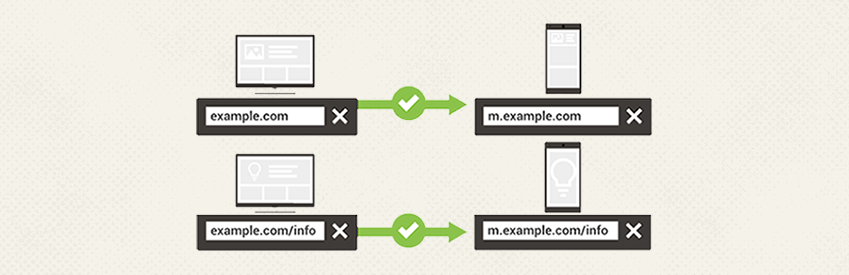
This WordPress plugin will detect mobile devices and redirect the user to the equivalent mobile page as set in the metabox that is added to your page and post screens upon activation. You can optionally override equivalent redirects and instead redirect all mobile users to one URL.

Features

  • Unlimited possible page/post redirects
  • Set mobile URL in meta box on each page/post
  • Option to redirect blog index in settings
  • Option to override equivalent redirects and redirect all mobile users to one URL
  • Option to redirect tablets as mobile or not
  • Comprehensive mobile detection library
  • Google recommended 302 redirects for mobile
  • Option to let mobile visitors “View Full Site”. To use this feature add a link like “http://example.com/?view_full_site=true” anywhere on your mobile site.
  • Built in support for custom post types

Configuring cache plugins for Equivalent Mobile Redirect

Some caching software set on your desktop site may override Equivalent Mobile Redirect’s mobile detection method and then the redirects will not function properly. Fortunately, most caching plugins can be set to disable caching when mobile devices are detected.

If you use: W3 Total Cache, WP Super Cache, Wordfence, WP Rocket, Hyper Cache, Quick Cache Pro, WP Simple Cache, Comet Cache, WPEngine, or other caching plugins or services.

In the settings you will need to disable caching for the following User Agents: iPhone, iPod, Android, BB10, BlackBerry, webOS, IEMobile/7.0, IEMobile/9.0, IEMobile/10.0, MSIE 10.0, iPad, PlayBook, Xoom , P160U, SCH-I800, Nexus 7, Touch

Annotations for desktop and mobile URLs

To help search engines understand separate mobile URLs tags are automatically added to the desktop pages to tell crawlers about it. For a more in-depth explaination of annotations please see Google developers

Known limitations

  • Some touchscreen devices (eg. Microsoft Surface) are tough to detect as mobile since they can be used in a laptop mode.
  • If the mobile browser is set on Desktop mode, the Mobile Detect script has no way of knowing that the device is mobile.
  • There are hundreds of devices launched every month, we cannot keep a 100% up to date detection rate.

Automatic Installation

  1. Login to your Dashboard as admin.
  2. Once logged in select Plugins -> Add New.
  3. Upload Equivalent Mobile Redirect and activate.
  4. Set mobile redirects in the metabox on pages and posts.
  5. Option to set whether you want tablets to be redirected in Settings -> EMR Settings.
  6. Option to set whether you want to override equivalent redirects and redirect all mobile users to one URL in Settings -> EMR Settings.
  7. Option to set whether you want to redirect blog index in settings in Settings -> EMR Settings.

Manual Install

  1. Extract the contents of equivalent-mobile-redirect.zip and upload to the wp-content/plugins folder.
  2. Activate the plugin through the ‘Plugins’ menu in WordPress
  3. Set mobile redirects in the metabox on pages and posts
  4. Option to set whether you want tablets to be redirected in Settings -> EMR Settings.
  5. Option to set whether you want to override equivalent redirects and redirect all mobile users to one URL in Settings -> EMR Settings.
  6. Option to set whether you want to redirect blog index in settings in Settings -> EMR Settings.

سوالات متداول

I activated the plugin and nothing happened?

This plugin will only redirect users who view the site on a mobile device and you must first fill in redirects in the metabox on pages and posts.

What format should I add the mobile URL in the metabox?

You should add the full mobile URL including the “http://”. For example: http://example.com

What if my homepage is my default blog posts or blog index?

Option to set whether you want to redirect blog index in settings in Settings -> EMR Settings.

What if I want to redirect all mobile users to 1 URL instead of the equivalent pages?

Option to set whether you want to override equivalent redirects and redirect all mobile users to one URL in Settings -> EMR Settings.

How can I give my users the option to view the full site

If you want to use this feature set a link to “http://example.com/?view_full_site=true” anywhere on your mobile site. By default the cookie is set to expire after 24 hours.

×
نظری برای این آیتم موجود نیست.
0 0 رای ها
امتیازدهی
اشتراک در
اطلاع از
0 نظرات
قدیمی‌ترین
تازه‌ترین بیشترین رأی
بازخورد (Feedback) های اینلاین
مشاهده همه دیدگاه ها
هیچ نسخه‌ای برای این آیتم موجود نیست.
★★★★★
★★★★★
3.9 /5 (33 نظر)

قیمت:

رایگان

نگارش

آخرین انتشار

13 اردیبهشت 1405

آخرین بروزرسانی

2 ماه پیش

نصب های فعال

2,000+

نگارش وردپرس

وردپرس 3.0+

تست شده از نسخه

وردپرس 5.6.17

نگارش PHP

-

نسخه ها

0 نسخه




