
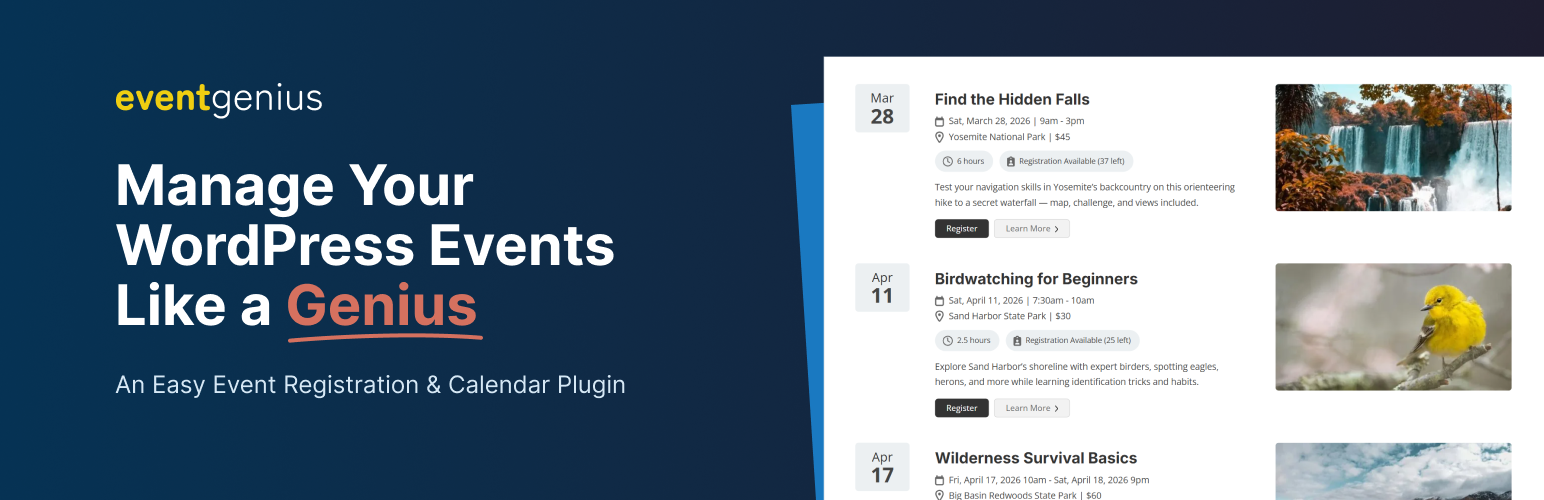
Event Genius – Event Management, Registration, RSVP, and Tickets

Event Genius – Event Management, Registration, RSVP, and Tickets

توسط

Complete WordPress Event Management & Registration Solution
Event Genius is a powerful yet easy-to-use free event registration plugin designed for schools, sports organizations, pickleball clubs, membership sites, fitness classes, conferences, and any business needing comprehensive event registration capabilities. Whether you need a simple RSVP form or a full-featured event registration system, Event Genius makes event planning effortless.

Event Genius is a modern WordPress event management plugin built by an experienced team with a deep understanding of what event organizers need. It offers a streamlined alternative to plugins like The Events Calendar and Events Manager, with a focus on flexibility, performance, and ease of use.

Our goal is to provide a robust and intuitive event management experience that works out of the box while still offering the flexibility to grow with your needs. If you need help, our team is here to support you.

Event Management Features

Unlimited Events & Event Registrations
No limits on how many events you can create or attendees you can manage through our event registration and ticketing system. Perfect for creating event lists or an interactive calendar where your visitors can register for events.

Event Details Control
Set custom start and end dates, assign venues and organizers to an event, set a cost, set a registration capacity, add images and descriptions for each event.

Multiple Event Calendar Views
Choose from list, month, and grid views for displaying your events in an organized event calendar format. Allow visitors to toggle between the views and filter based on venue, category, and search terms.

Google Calendar & iCal Event Sync
Allow users to add your events to their personal calendars with a few clicks, which will significantly increase your event attendance.

Dedicated Venue and Organizer Pages
Create individual pages for venues and organizers with detailed information and lists of related events. Show social proof that the venues and organizers of your events will create meaningful experiences.

Event Registration Form Builder
Create custom event registration form solutions with drag-and-drop ease, adding fields like text inputs, dropdowns, and checkboxes. Make fields required, add a terms and conditions acknowledgement, and prevent duplicate registrations. Create event registration forms exactly as you need them. Accept RSVP submissions and allow users to access tickets.

Flexible Registration Display
Registration forms automatically appear on event pages, or use blocks and shortcodes to place them anywhere on your website.

Attendee List Management
Display attendee lists on event pages or use dedicated blocks and shortcodes for flexible placement.

Automated Event Emails
Send confirmation emails to attendees and notifications to event organizers automatically.

Customizable Email Templates
Customize both attendee confirmation emails and organizer notification emails with your own branding and messaging.

Event Registration Controls
Set registration start/end times, event capacity limits, or disable registration entirely while keeping event information visible.

Self-Cancellation System
Attendees can cancel their registration or RSVP through secure email links for better event management.

Event Management Admin Tools
Add, edit, delete events, export event reports, and manage event attendees from your WordPress dashboard.

CSV Export Functionality
Export all event registrations to CSV format for easy data analysis and management.

Free Recurring Events Support
Create daily, weekly, or monthly repeating events for ongoing event management needs. Free recurring events support is included in Event Genius.

Advanced SEO for Recurring Events
Prevent duplicate content penalties with automatic canonical URLs, smart sitemap filtering, and 301 redirects for invalid instances. Each recurring event instance gets its own unique URL optimized for search engines. Learn more about recurring events SEO.

Why Choose Our WordPress Event Management Plugin?

Fast & Lightweight Event Calendar – Optimized for performance, even on high-traffic websites.
Mobile-Friendly Event Registration – Fully responsive event forms and event calendar for seamless experience on all devices.
Block Theme & Full Site Editing Support – Complete compatibility with WordPress block themes and full site editing (FSE). Design custom event pages, organizer pages, and venue pages using the Site Editor without any custom code. Perfect for block themes like Twenty Twenty-Four.
SEO-Optimized Event Pages – Advanced SEO features for recurring events including unique canonical URLs, automatic redirects for invalid instances, and smart sitemap filtering. Compatible with Yoast SEO, Rank Math, and other popular SEO plugins.
WordPress Caching Plugin Compatible – Built-in support for WP Super Cache, W3 Total Cache, WP Rocket, and LiteSpeed Cache. Automatically clears cache and refreshes dynamic content to ensure accurate registration information on cached pages.
Flexible Registration Confirmation – Choose when registrations are confirmed and when the confirmation email is sent: automatically after registration or manual review only, with a one-click Send Confirmation Email from the registration in the admin.
Regular Event Management Updates & Dedicated Support – We want to provide the best possible experience for our users. Please reach out if we can help.

Perfect For Event Management Needs:

Event Planners – Comprehensive event management tools for professional event planning
Event Organizers – Streamlined event registration, RSVPs, and attendee management
Event Websites – Complete event calendar and event management solution
Event Businesses – Professional event registration, tickets, and event management capabilities
Sports Clubs – Perfect for sports registration and pickleball registration needs
Schools & Organizations – Ideal for managing event list displays and RSVP form requirements

Upgrade to Event Genius Pro

Unlock powerful advanced features to help you manage events more efficiently:

Accept Payments & Sell Tickets – Accept payments through Stripe and PayPal, or track offline payments manually.
Multiple Registration Forms – Create unique forms for different event types with customized confirmations and notifications.
Multiple Registration Types – Define separate registration options on one event (for example General, VIP, or early bird), each with its own name, price, and optional capacity, so attendees pick the tier that fits them.
Check-in & Attendance Tracking – Streamline check-in and track attendance status with automated follow-up emails.
Event Series Management – Group related events into series with flexible registration options for full series or individual dates.
Scheduled Event Reminders – Automatically send reminder emails before events and follow-up messages after to improve engagement.
Multiple Email Templates – Create different templates for various event types and maintain consistent branding.
Register Multiple Guests – Allow attendees to register additional guests during the registration process.
List Events Registered For – Help attendees see all their registered events in one place.
Manually Email Registrants – Send targeted emails to specific registrants or groups.
Advanced Form Fields – File uploads, date pickers, attendee number fields, and hidden admin fields.
Multiple Event Registration – Allow attendees to register for multiple events at once.
Offline Payment Tracking – Track and manage offline or manual payments with complete control.

Upgrade to Event Genius Pro to unlock all these features and more!

  1. Go to Plugins > Add New in your WordPress dashboard.
  2. Search for Event Genius or “event management”.
  3. Click Install Now, then Activate.
  4. Go to Events in the admin menu to start creating and managing your events.

سوالات متداول

Who should use Event Genius?

Event Genius is perfect for schools, sports organizations, membership sites, fitness classes, conferences, event planners, event organizers, and any business or organization that needs to manage events, registrations, RSVPs, or tickets. Whether you’re hosting a small workshop or a large conference, our event management plugin provides the tools you need.

Do I need coding skills to use Event Genius?

No coding skills required! Event Genius is designed to be user-friendly and intuitive. You can create events, build registration forms, manage attendees, and customize your event calendar all through our easy-to-use WordPress dashboard interface. Advanced users can also take advantage of our developer-friendly features like hooks, filters, and customizable templates.

What do I do if something looks wrong with my events because of my theme?

We would love to help if we can! Please post in the WordPress.org support forum or reach out to us on our website.

Is this plugin developer friendly?

We have a number of hooks and filters as well as support for completely customizing the template files. If you need help or would like to submit a request for an additional hook, please reach out to us!

Is there a limit to the number of events I can create with this plugin?

No! You can create unlimited events and event registrations.

Can I display an event calendar anywhere on my WordPress website?

Yes! Use our shortcode [event_genius_calendar id=(insert ID)] to embed an event calendar anywhere on your event website. Search for the Event Genius calendar block.

Does this event management plugin support recurring events?

Yes, repeating or recurring events on a simple schedule are available in the free version of our event registration plugin!

How does the event registration system work?

Our event registration system allows attendees to register for events or RSVP through customizable forms, with automatic email confirmations and event management tools.

Can I display an attendee list for each event?

Yes! You can display an attendee list either on the single event page or using our dedicated attendee list block/shortcode for flexible placement anywhere on your website.

How can I display a registration form?

An event registration form is automatically added to the single event page, and you can place an event registration form anywhere using our registration form block or shortcode for maximum flexibility.

Can I customize the registration form?

Yes! Our event registration form builder allows you to add custom fields including text inputs, dropdowns, checkboxes, and more to capture the specific information you need from your event attendees.

Can I customize the notification and confirmation emails?

Absolutely! You can customize both the confirmation emails sent to attendees and the notification emails sent to event organizers with your own branding and messaging.

Can attendees cancel their registration?

Yes, attendees can cancel their registration through a secure link sent to the email that was registered with, providing them with full control over their event participation or RSVP.

Can I set a start and end time for registration?

Yes! You can set specific registration open and close dates for each event, giving you complete control over when attendees can register.

Can I set a capacity for each event?

Yes, you can set a maximum capacity for each event, to limit the number of event tickets or RSVPs allowed, and the registration form will automatically close when the event reaches capacity.

Can I disable registration?

Yes, you can disable registration for any event while still displaying the event information and details to your audience.

How can I export my event registrations?

You can export all event registrations to CSV format from the admin dashboard, making it easy to analyze attendee data and manage your events effectively.

Does this plugin work with caching plugins?

Yes! Event Genius includes built-in support for popular WordPress caching plugins including WP Super Cache, W3 Total Cache, WP Rocket, and LiteSpeed Cache. The plugin automatically clears cache when registrations occur and includes a smart content refresh system that updates dynamic information (registration status, attendee counts, capacity) on cached pages. Learn More

Can I use this for recurring events?

Yes! Our plugin includes free recurring events support, allowing you to create daily, weekly, or monthly repeating events. This is perfect for ongoing classes, regular meetings, or recurring sports events like pickleball registration sessions.

How do I collect RSVPs or event registrations?

Our RSVP form system is built right into the plugin. Simply create an event and the registration form will automatically appear on the event page. You can also use our registration form blocks or shortcodes to place custom event registration form solutions anywhere on your website. The system handles everything from form submission to email confirmations automatically to make handling RSVPs a breeze.

What’s the best WordPress event plugin for schools or sports clubs?

Event Genius is specifically designed for schools and sports organizations! Our free event registration plugin includes features perfect for sports leagues, pickleball leagues, and school events. With unlimited events, free recurring events, RSVP, ticketing, and our easy-to-use custom event registration form builder, it’s the ideal solution for managing sports clubs, school activities, and any organization needing comprehensive event management.

How does SEO work with recurring events?

Event Genius automatically handles SEO for recurring events to prevent duplicate content issues. Learn more about recurring events SEO.

Does Event Genius work with block themes and full site editing?

Yes! Event Genius is fully compatible with WordPress block themes and full site editing (FSE). You can customize your event pages, organizer pages, venue pages, and calendar displays using the WordPress Site Editor without any custom code. Event Genius provides specialized blocks that automatically detect the page context and display the appropriate information. Perfect for block themes like Twenty Twenty-Four. Learn more about block theme support

Can I customize the URL slugs for my events, venues, and organizers?

Yes! Go to Events > Settings > General and open the “Post Link Options” section. Click “Show slug options” to change the URL path used for single events, event archives, venues, organizers, event categories, event tags, and (in Pro) series. This is useful if you want URLs in your language (e.g. “veranstaltungen” instead of “events”) or if another plugin already uses the same slug. Links to your events are automatically updated after you save.

I have another calendar or events plugin. Can I test Event Genius before deciding to switch?

Yes. When you activate Event Genius, it checks whether your site already uses the same URL slugs (e.g. /events/ or /event/) for another plugin or for pages. If there’s a conflict, Event Genius adds an “evge-” prefix to its slugs (e.g. /evge-events/) so both can run side by side without 404s or overwriting. You can then try Event Genius and, if you prefer it, change or remove the prefix later under Events > Settings > General in “Post Link Options”

Can I show events on my blog homepage with my regular posts?

Yes. Go to Events > Settings > Events and open the “Blog Loop” section. Enable “Include events in main blog loop” to show events together with posts on your blog homepage and in tag archives. Events will still appear on your main events page as usual. Learn More

Can I choose when a registration is confirmed and when the confirmation email is sent?

Yes. Set the confirmation condition for your form. Choose “After registration, automatically” for automatic confirmation and email, or “Manual review only” so registrations stay pending until you approve them and send the confirmation email yourself from the registration management page using the Send Confirmation Email button. Learn More

×
نظری برای این آیتم موجود نیست.
0 0 رای ها
امتیازدهی
اشتراک در
اطلاع از
0 نظرات
قدیمی‌ترین
تازه‌ترین بیشترین رأی
بازخورد (Feedback) های اینلاین
مشاهده همه دیدگاه ها
هیچ نسخه‌ای برای این آیتم موجود نیست.
★★★★★
★★★★★
5.0 /5 (9 نظر)

قیمت:

رایگان

نگارش

آخرین انتشار

18 اردیبهشت 1405

آخرین بروزرسانی

1 ماه پیش

نصب های فعال

500+

نگارش وردپرس

وردپرس 6.0+

تست شده از نسخه

وردپرس 6.9.4

نگارش PHP

PHP 7.4+

نسخه ها

0 نسخه




