
Fourteen Colors

Fourteen Colors

توسط

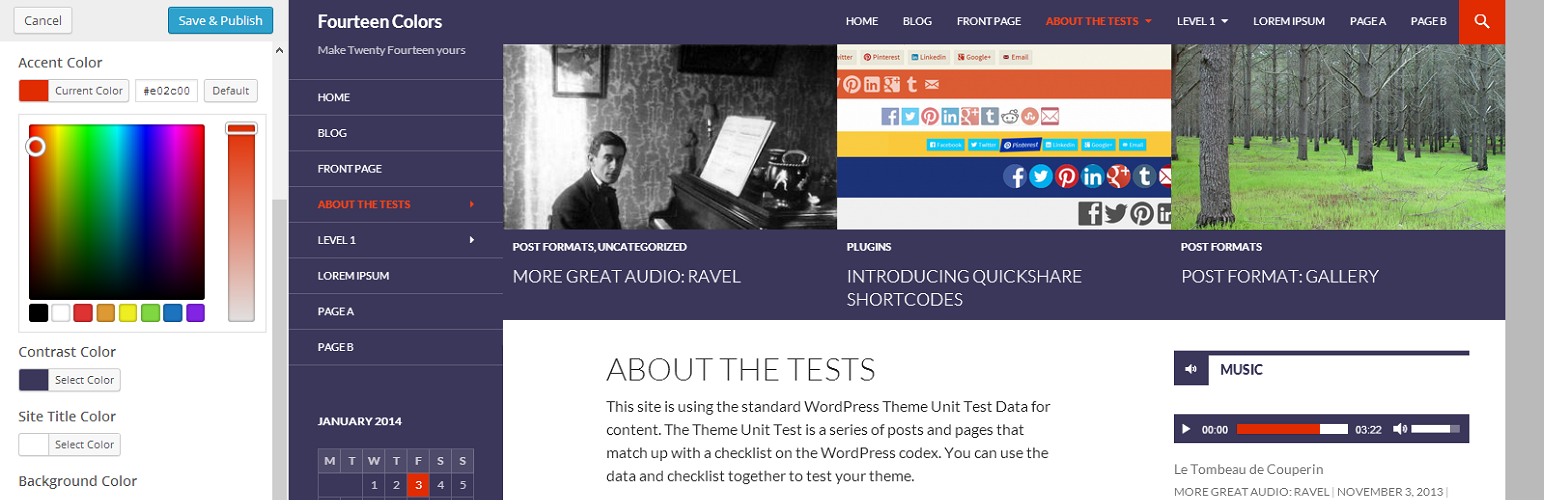
Not a big fan of green and black? Love the layout of Twenty Fourteen, but need its colors to match your brand? Don’t have time to create a child theme, or want to change up your site’s look on a regular basis without technical overhead?

Fourteen Colors is the most efficient way to re-color the Twenty Fourteen theme. It provides two color pickers, which together control:

  • Header/Sidebar/Footer Background Color
  • Featured Content Background Color
  • Link Color
  • Search Bar Color
  • Navigation Menu Hover Colors
  • Text Selection/Highlight Color
  • Audio/Video Player Colorschemes
  • And more…

Fourteen Colors automatically adjusts your color choices to ensure the minimum required contrast to keep Twenty Fourteen accessible-ready, and to keep your site as readable as possible. The plugin is designed to support almost any combination of colors, so you can be creative and express yourself with your site! Please report any issues on the support forums, after reading the FAQ and the changelog to see if they address your question.

The Accent Color feature was originally developed in Twenty Fourteen core, but it was removed near the end of the initial development cycle due to a variety of concerns. This plugin addresses those concerns and adds the contrast color feature to enable a broad range of custom colorschemes.

Special thanks to the entire Twenty Fourteen team for their work on the accent color throughout the development cycle. This plugin (and Twenty Fourteen) would not exist without their hard work and attention to detail.

  1. Take the easy route and install through the WordPress plugin installer OR
  2. Download the .zip file and upload the unzipped folder to the /wp-content/plugins/ directory
  3. Activate the plugin through the ‘Plugins’ menu in WordPress
  4. Go to the Customizer (Appearance -> Customize) and adjust the two new color pickers under the “Colors” heading to your liking

سوالات متداول

I tried using Fourteen Colors with a theme other than Twenty Fourteen and …

Don’t. There is a known bug where the plugin may be applied to other themes when live previewing them, but Fourteen Colors will prevent itself from functioning when the current theme is not Twenty Fourteen or a child.

Child Themes

Fourteen Colors is a plugin, not a child theme, because it is primarily programmatic (ie, it would only consist of a functions.php file), and for flexibility.

You can use Fourteen Colors with both Twenty Fourteen and child themes. Be aware that the Fourteen Colors settings are stored with the active theme, so if you switch to a child theme or switch child themes, you’ll need to re-set your colors. Child theme compatibility depends on the extent of changes made by the child theme. But child theme developers can hook into Fourteen Colors to extend it to adapt to their changes, allowing the plugin to work seamlessly even if the child theme is significantly different than the parent theme.

Suggested/Recommended Colors

The contrast color option tends to work best with colors that are either grayscale or close to grayscale. Try light or dark grays in conjunction with any accent color if the default black feels too bold.

Accent colors work best when they are intense, fully saturated colors that avoid anything too light or too dark. However, brighter colors such as yellow do work well, as do darker colors such as black, with a good choice of contrast color. If a particular set of colors feels close, but not quite right, try making the accent color more intense and making the contrast color lighter (if it’s already light) or darker (if it’s already dark) to increase the overall contrast of your site.

Known Issues

Due to the automatic generation of secondary colors, in order to maximize color contrast ratios, undesirable colors may come up in some places. You can override these with custom CSS, and feel free to post in the support forums if you can’t figure it out (but search there first).

Please note that if you’re having trouble getting the plugin to “work” it is extremely likely that you’re doing something wrong. Don’t forget that the color options are added to the Customizer.

Supported Colors

All colors are supported except for pure white (#fff), which should technically work but results in a poor user experience due to the lack of contrast, which helps to provide visual hierarchy. Pure black (#000) accent colors are more fully supported, but can also have (less significant) issues with providing proper visual hierarchy.

Block Editor Support

Fourteen Colors does its best to support custom styles in the block editor. While most customized styles will not show up in the editor, using the green and black colors from the color palettes when selecting block styles will allow content-colors to be customized by this plugin.

×
نظری برای این آیتم موجود نیست.
0 0 رای ها
امتیازدهی
اشتراک در
اطلاع از
0 نظرات
قدیمی‌ترین
تازه‌ترین بیشترین رأی
نسخه حجم فایل SHA256 تغییرات دانلود
1.6 15 کیلوبایت -
دانلود
×
★★★★★
★★★★★
4.8 /5 (48 نظر)

قیمت:

رایگان

نگارش

1.6

آخرین انتشار

11 اردیبهشت 1405

آخرین بروزرسانی

4 ماه پیش

نصب های فعال

9,000+

نگارش وردپرس

وردپرس 3.6+

تست شده از نسخه

وردپرس 6.3.8

نگارش PHP

-

نسخه ها

1 نسخه




