Header Footer Code Manager

Header Footer Code Manager

توسط

Header Footer Code Manager by 99 Robots is a easy interface to add snippets to the header or footer or above or below the content of your page.

BENEFITS

  • Never have to worry about inadvertently breaking your site by adding code
  • Avoid inadvertently placing snippets in the wrong place
  • Eliminate the need for a dozen or more silly plugins just to add a small code snippet – Less plugins is always better!
  • Never lose your code snippets when switching or changing themes
  • Know exactly which snippets are loading on your site, where they display, and who added them

FEATURES

  • Add an unlimited number of scripts and styles anywhere and on any post / page
  • Manage which posts or pages the script loads
  • Supports custom post types
  • Supports ability to load only on a specific post or page, or latest posts
  • Control where exactly on the page the script is loaded – head, footer, before content, or after content
  • Script can load only on desktops or mobile. Enable or disable one or the other.
  • Use shortcodes to manually place the code anywhere
  • Label every snippet for easy reference
  • Plugin logs which user added and last edited the snippet, and when

PAGE DISPLAY OPTIONS

  1. Site wide on every post / page
  2. Specific post
  3. Specific page
  4. Specific category
  5. Specific tag
  6. Specific custom post type
  7. Latest posts only (you choose how many)
  8. Manually place using shortcodes

INJECTION LOCATIONS

  1. Head section
  2. Footer
  3. Top of content
  4. Bottom of content

DEVICE OPTIONS

  • Show on All Devices
  • Only Desktop
  • Only Mobile Devices

SUPPORTED SERVICES

  • Google Analytics
  • Google Adsense
  • Google Tag Manager
  • Clicky Web Analytics or other analytics tracking scripts
  • Chat modules such as Olark, Drip, or
  • Pinterest site verification
  • Facebook Pixels, Facebook Scripts, Facebook og:image Tag
  • Google Conversion Pixels
  • Twitter
  • Heatmaps from Crazy Egg, notification bars Hello Bar, etc.
  • It can accept ANY code snippet (HTML / Javascript / CSS) from any service
  • and the list goes on and on…

MULTISITE NOTE

If using this plugin on a multisite network, please make sure that the plugin is activated on a subsite level only.

Plugin Information

  1. Upload header-footer-code-manager to the /wp-content/plugins/ directory
  2. Activate the plugin through the ‘Plugins’ menu in WordPress
  3. Go to plugins page to see instructions for shortcode and php template tags

NOTE: If using this plugin on a multisite network, please make sure that the plugin is activated on a subsite level only.

سوالات متداول

Q. Why do my scripts appear as text on the website?

A. Please make sure to enclose your script within script tags – <> Insert Script Here <>.

Q. Where are this plugin’s Settings located?

A. After activating the plugin, you can click on settings link under the plugin name OR you can click the HFCM tab on the left side navigation. From there, you can add, edit, remove, and review code snippets.

Q. How do I add code snippets to all my posts/pages?

A. With the version 1.1.4 of the HFCM plugin, we have replaced the Specific Custom Post Types with the ability to add code to All Post Types which include posts, pages, attachments and custom post types.

Q. I have a question

A. Since this is a free plugin, please ask all questions on the support forum here on WordPress.org. We will try to respond to every question within 48 hours.

Q. How can I request a feature or encourage future development?

A. Free plugins rely on user feedback. Therefore, the best thing you can do for us is to leave a review to encourage others to try the plugin. The more users, the more likely newer features will be added. That’s a very small thing to ask for in exchange for a FREE plugin.

Q. Do you support X or Y tracking scripts?

A. If your script is not supported, just let us know and we’ll look into it immediately. We will do our best to ensure all reputable services are supported. When requesting support for a particular script, it would be nice to get a sample of the script so that we can see its structure.

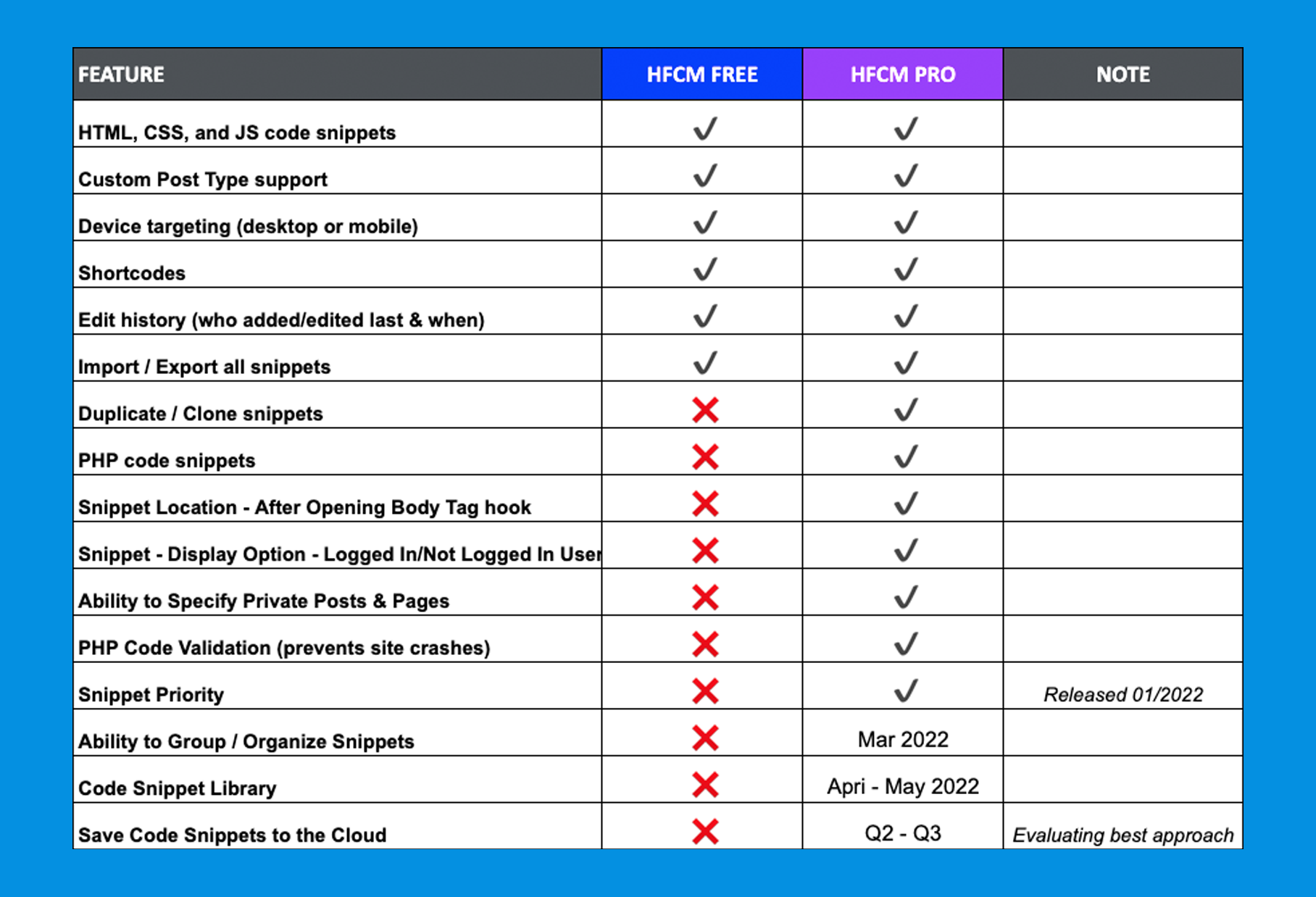
Q. What are the differences between HFCM Pro vs. Free?

A. The PRO version contains many more powerful features not available in the FREE version in addition to forthcoming features. See the PRO vs FREE differences.

×
نظری برای این آیتم موجود نیست.
0 0 رای ها
امتیازدهی
اشتراک در
اطلاع از
0 نظرات
قدیمی‌ترین
تازه‌ترین بیشترین رأی
بازخورد (Feedback) های اینلاین
مشاهده همه دیدگاه ها
نسخه حجم فایل SHA256 تغییرات دانلود
1.1.44 69 کیلوبایت -
دانلود
×
★★★★★
★★★★★
4.9 /5 (305 نظر)

قیمت:

رایگان

نگارش

1.1.44

آخرین انتشار

9 اردیبهشت 1405

آخرین بروزرسانی

2 ماه پیش

نصب های فعال

600,000+

نگارش وردپرس

وردپرس 4.9+

تست شده از نسخه

وردپرس 6.9.4

نگارش PHP

PHP 5.6.20+

نسخه ها

1 نسخه