
Hide Address Fields for WooCommerce

Hide Address Fields for WooCommerce

توسط

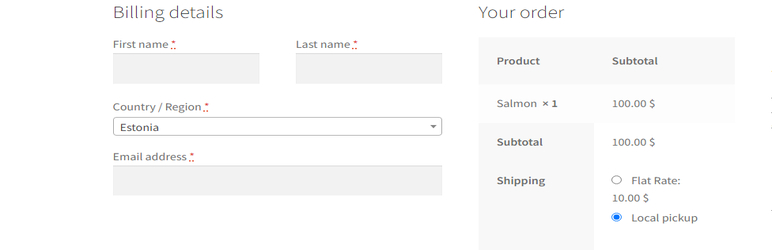
WooCommerce plugin for hiding the billing address fields on checkout based on the selected shipping/payment methods.

Documentation | Contact

How To Use

  1. Plugin Settings: Choose for which payment/shipping methods the billing address fields will be hidden.

How It Works

  • Each time the customer will modify his shipping/payment methods on checkout, the plugin will show/hide the billing address fields accordingly.

Features

  • Conditions: Choose which shipping methods and payment methods will cause the billing address fields to be hidden (for example local pickup and cash).
  • Billing Address Fields: Choose which billing address fields to hide when conditions are met.
  • Top Options: The shipping/payment options can be moved to the billing details section on checkout.
  • Customer Address: The address of the customer from previous orders will be kept in his user details after creating an order with no billing address fields.
  • Shipping Options Shortcode: Display the shipping options anywhere using the [haf_shipping_options] shortcode.

Minimum Requirements

WordPress 5.2 or greater
PHP 7.0 or greater
WooCommerce 3.4 or greater

Automatic installation

  1. Go to your Dashboard => Plugins => Add new
  2. In the search form write: Condless
  3. When the search return the result, click on the Install Now button

Manual Installation

  1. Download the plugin from this page clicking on the Download button
  2. Go to your Dashboard => Plugins => Add new
  3. Now select Upload Plugin button
  4. Click on Select file button and select the file you just download
  5. Click on Install Now button and the Activate Plugin

سوالات متداول

How to hide the billing address fields on checkout for Local pickup regardless of the payment method?

Select Local pickup in the ‘Shipping methods’ option and all of the methods in the ‘Payment methods’ option.

Why the billing address fields aren’t hidden?

You must select both shipping methods and payment methods in the plugin settings, and select the equivalent methods on checkout.
The billing_country and address_1 fields must not be disabled on checkout.
The plugin doesn’t support the WooCommerce Cart/Checkout Blocks.

×
نظری برای این آیتم موجود نیست.
0 0 رای ها
امتیازدهی
اشتراک در
اطلاع از
0 نظرات
قدیمی‌ترین
تازه‌ترین بیشترین رأی
هیچ نسخه‌ای برای این آیتم موجود نیست.
★★★★★
★★★★★
5.0 /5 (3 نظر)

قیمت:

رایگان

نگارش

آخرین انتشار

21 اردیبهشت 1405

آخرین بروزرسانی

3 ماه پیش

نصب های فعال

300+

نگارش وردپرس

وردپرس 5.2+

تست شده از نسخه

وردپرس 6.9.4

نگارش PHP

PHP 7.0+

نسخه ها

0 نسخه




