
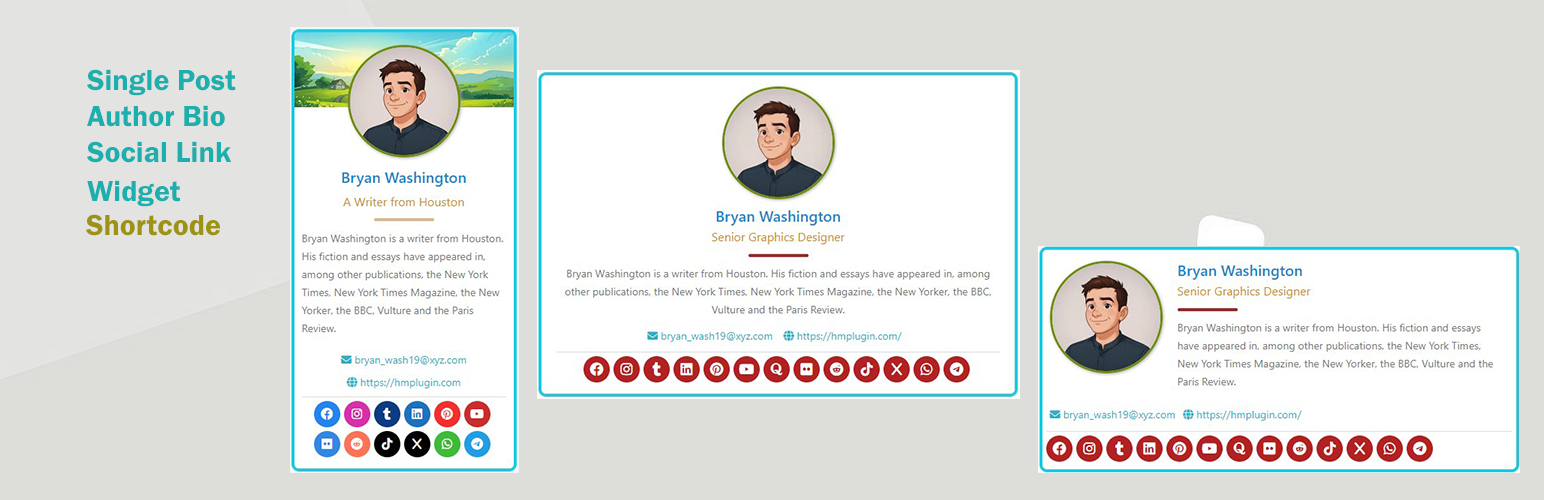

Cool Author Box is the WordPress Author Box Plugin that displays a responsive author box to your theme widget area or in a single post with social media links. You can use your personal info with gravatar or uploaded image. 12 common social links help you to connect with more people.
This plugin can display author box in two ways. One is a global widget with personal information. And the other is in a single post content which shows the post author information. This is an excellent plugin to display author image/avatar, name, title, biography, email, website, social links and more.
Live Demo | More Info | Live Chat | Support
Cool Author Box is a simple, effective and powerful plugin to display your author info.
🌟 Plugin Features:
- Display a global author box widget
- Display author information in post content area.
- Fully Responsive
- 12 social network links available
- Social network links customization
- Individual post author infobox
- Set profile background banner in the author box widget
- Set author box position in the post content – top or bottom
- Post author can upload and set their own picture
- Post author can set their title
- Post author can set their social links
🌟 Author Info Features:
- Author name
- Author title
- Author author image/avatar
- Author biography info
- Author email
- Author website
- Author social links
- Individual post author infobox
- Profile banner in widget
🌟 Options in information settings:
- Author name
- Author title
- Author email
- Author website
- Author biography info
- Biographical Info Font Size
- Option to display gravater or uploaded image
🌟 Options in template settings:
- Choose from 7 available templates color
- Display option – Post / Page / Both / None
- Author box position: top or bottom of the content
- Show/hide author title
- Show/hide author email
- Show/hide author website
- Photo/Social icon shape: Square, Rounded or Circle
- Author Image/Gravatar width
- Show / Hide profile banner option
🌟 Pro Features
- Name font color / font size
- Title font color / font size
- Description / biographical info font color / size
- Email / Website info font color / size
- Profile Image animation option
- Widget content alignment option – Left / Center / Right
- Profile image border width and color option
- Container border width and color option
- Container background color option
- Container border radius option
📋 Translation Ready:
- POT file included (/languages/)
- Arabic
- Bengoli
- French (France)
- German
- Italian
- Spanish (Spain)
👍 Feedback/Rating:
If you find this plugin helpful, feel free to give us your valuable review. Rate us and share this plugin with your friends and others. This will motivate us and help us to grow.
Rate Us
🔥 Other Plugins from HM Plugin
👉 WP Books Gallery Books Gallery Plugin for WordPress
👉 Worldwide Breaking News Headlines Breaking News, Headlines Widget Plugin for WordPress
👉 WP Top News Top News, Breaking News, Headlines Shortcoded Plugin for WordPress
👉 WordPress Stripe Donation Donations Coolection Plugin for WordPress using Stripe Payement
👉 Tiny Bar Message Bar Plugin for WordPress to display Message at Top/Bottom Bar of a web page
👉 HM – CoolAuthorBox Author Box plugin for WordPress to display author info
👉 HM Resume Manager A Resume/CV Manager Plugin for WordPress
👉 HM Product Catalog A Product Catalog Plugin for WordPress
👉 HM Wc Product Advertiser Product Advertiser Plugin for Wocommerce
👉 WP Scroll To Post Display random post(Single) at the bottom right corner
👉 HM Recent Posts Widget Ticker Post plugin for WordPress
👉 WP Alert Bars Notification/Alert box Plugin for WordPress
👉 FaceBook LikeBox A FaceBook LikeBox Plugin for WordPress
👉 WP Display FAQ FAQs manager plugin for WordPress
👉 HM Logo Showcase Logo manager plugin for WordPress






