
Image Size Selection for Divi

Image Size Selection for Divi

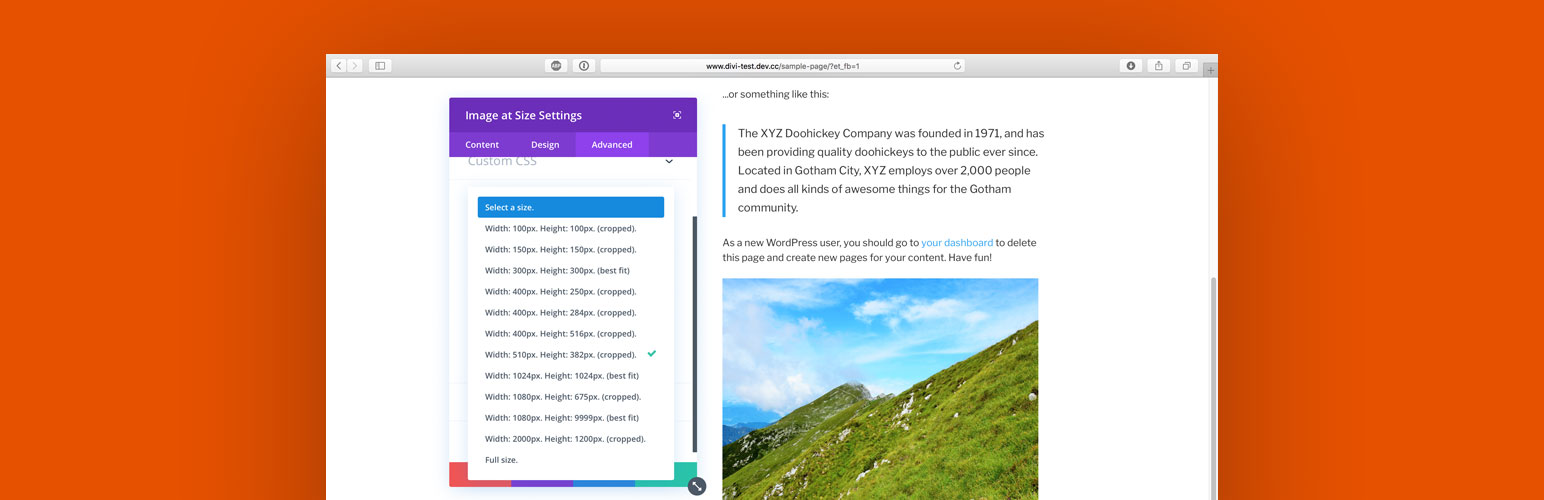
Image Size Selection for Divi adds a Visual Builder compatible Divi module called “Image at Size” that allows the user to select images cropped to a set size. Great for SEO!

  • Display cropped images instead of originals to cut page load time.
  • Supports srcset and sizes image attributes for high-resolution retina displays.
  • Compatible with the Visual Builder.
  • Mobile responsive.
  • Lightweight.

Requirements

This plugin is designed to work with the Divi Builder plugin or a theme such as Divi or Extra by Elegant Themes (affiliate link).

My Plugins for Divi

Supporting Image Size Selection for Divi

If you found this plugin helpful, please support the developer with a small donation:

  1. Upload “image-size-selection-for-divi” to the /wp-content/plugins/ directory.
  2. Activate the plugin through the “Plugins” menu in WordPress.
  3. Add a new “Image at Size” module to any Page or Post that uses the Divi Builder.
  4. Select an image size in the module under the “Advanced” tab.
  5. Click the green check to save the module.
  6. Click the green “Save” button in the lower right-hand corner of the screen to Save changes.

سوالات متداول

پرسش و پاسخی برای این آیتم موجود نیست.
×
نظری برای این آیتم موجود نیست.
0 0 رای ها
امتیازدهی
اشتراک در
اطلاع از
0 نظرات
قدیمی‌ترین
تازه‌ترین بیشترین رأی
هیچ نسخه‌ای برای این آیتم موجود نیست.
★★★★★
★★★★★
4.3 /5 (7 نظر)

قیمت:

رایگان

نگارش

آخرین انتشار

16 اردیبهشت 1405

آخرین بروزرسانی

3 ماه پیش

نصب های فعال

500+

نگارش وردپرس

وردپرس 4.0.0+

تست شده از نسخه

وردپرس 5.4.19

نگارش PHP

-

نسخه ها

0 نسخه




