
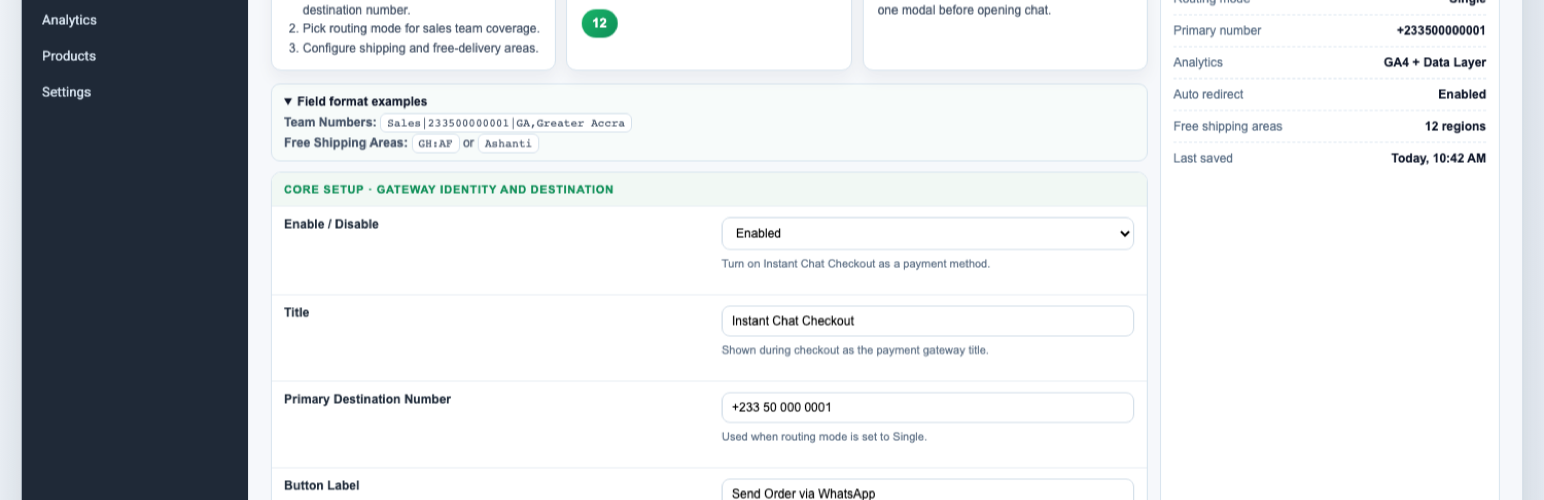

Instant Chat Checkout adds WhatsApp checkout for WooCommerce stores while still creating normal WooCommerce orders. Customers can start an order from a product page or checkout, send the order details to your WhatsApp number, and leave you with a trackable WooCommerce order in the admin.
Use it when your store sells through WhatsApp, phone follow-up, local delivery, pickup, or cash-on-delivery workflows and you want more structure than a basic chat button.
Key features:
- WhatsApp checkout payment gateway for WooCommerce.
- Product-page “Order on WhatsApp” button and quick order modal.
- Customer name, phone, email, country, region, address, quantity, and shipping fields.
- Shipping-aware order estimates that follow WooCommerce shipping setup.
- Team routing modes: single, round robin, and region/state routing.
- Free-shipping area controls driven by WooCommerce country/state settings.
- Google Analytics compatible tracking (
gtagand/ordataLayer). - Thank-you page WhatsApp handoff link.
- Admin dashboard snapshot for WhatsApp order activity.
Good fit for:
- Fashion, beauty, food, grocery, pharmacy, and local retail stores.
- Stores that confirm availability, delivery fees, or payment manually before dispatch.
- Stores that use WhatsApp as the main sales conversation channel.
- Cash-on-delivery, bank transfer, mobile money, local pickup, and assisted checkout flows.
- Teams that need to route orders to different WhatsApp numbers by region or rotation.
Why use this instead of a normal WhatsApp chat button?
- A normal chat button starts a conversation but does not structure the order.
- Instant Chat Checkout collects customer and delivery details before the WhatsApp handoff.
- The plugin creates a WooCommerce order, so store admins can still track order status, totals, and customer details.
- The WhatsApp message includes the order summary, customer details, and destination number.
This plugin is distributed under GPLv2 or later.
Quick Setup
- Install and activate WooCommerce.
- Install and activate Instant Chat Checkout.
- Open
WooCommerce > Settings > Payments > WhatsApp Order. - Enable the WhatsApp Order gateway.
- Enter your WhatsApp number in international format, for example
233501234567. - Save settings and test a simple product order.
- Optional: configure team routing, free-shipping areas, button text, analytics, and thank-you page behavior.






