
Jamatto Micropayments

Jamatto Micropayments

توسط

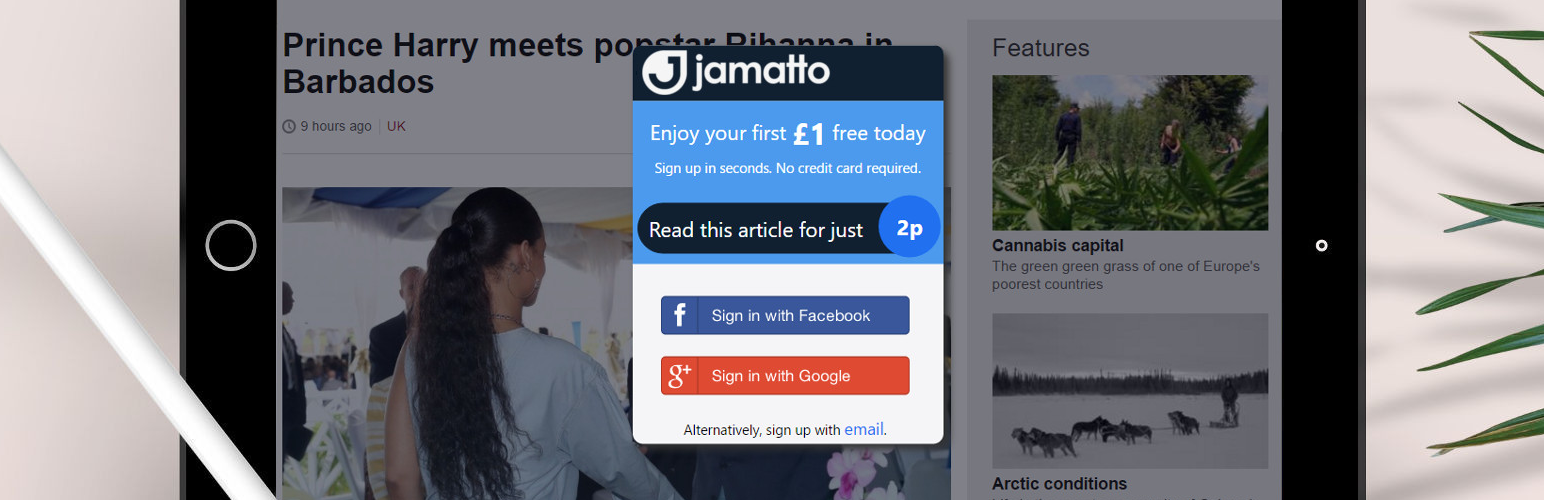
Have you ever considered turning your blogging into a source of income? In fewer than 30 seconds, Jamatto lets you accept small payments from your readers – either through simple donation buttons or by placing your premium articles or even just your premium paragraphs behind enticing one-click paywalls. Used by thousands of bloggers around the world.

You can literally be up and running accepting micropayments on your blog in under 30 seconds. Yes – that’s less than 30 seconds!

Check out the Screenshots Tab to see how the plugin adds to your blog.

The Screenshots Tab also shows you how to use the [jamatto-donate] and [jamatto-premium] shortcodes. It’s really that simple.

Installing the plugin directly from within WordPress (recommended):

  1. Go to your WordPress admin screen (the one where you normally add your new blog posts).
  2. Select the ‘Plugins’ menu item.
  3. Press the ‘Add New’ button.
  4. In the ‘Search plugins’ field, type ‘jamatto’ and press <ENTER>.
  5. Press ‘Install Now’ button next to the Jamatto plugin.
  6. Press the ‘Activate Plugin’ link.
  7. Voila! You’re accepting donations with Jamatto!
  8. Optionally, use the ‘Settings->Jamatto Micropayments’ screen to configure the plugin.

Alternatively, if you are not able to install plugins directly from the WordPress repository, you can manually install our plugin on your WordPress server:

  1. On this page, press the large ‘Download Version x.x’ button.
  2. Save the jamatto-micropayments.zip file to disk.
  3. Go to your WordPress admin screen (the one where you normally add your new blog posts).
  4. Select the ‘Plugins’ menu item.
  5. Press the ‘Add New’ button.
  6. Press the ‘Upload plugin’ and select the jamatto-micropayments.zip you just downloaded.
  7. Press the ‘Activate Plugin’ link.
  8. Voila! You’re accepting donations with Jamatto!
  9. Optionally, use the ‘Settings->Jamatto Micropayments’ screen to configure the plugin.

Alternatively, if your WordPress installation requires manual plugin placements:

  1. On this page, press the large ‘Download Version x.x’ button.
  2. Save the jamatto-micropayments.zip file to disk.
  3. Unzip and upload the jamatto-micropayments.zip file to the /wp-content/plugins/plugin-name directory on your server.
  4. Activate the plugin through the ‘Plugins’ screen in your WordPress plugins screen.
  5. Optionally, use the ‘Settings->Jamatto Micropayments’ screen to configure the plugin.

سوالات متداول

Installation Instructions

Installing the plugin directly from within WordPress (recommended):

  1. Go to your WordPress admin screen (the one where you normally add your new blog posts).
  2. Select the ‘Plugins’ menu item.
  3. Press the ‘Add New’ button.
  4. In the ‘Search plugins’ field, type ‘jamatto’ and press <ENTER>.
  5. Press ‘Install Now’ button next to the Jamatto plugin.
  6. Press the ‘Activate Plugin’ link.
  7. Voila! You’re accepting donations with Jamatto!
  8. Optionally, use the ‘Settings->Jamatto Micropayments’ screen to configure the plugin.

Alternatively, if you are not able to install plugins directly from the WordPress repository, you can manually install our plugin on your WordPress server:

  1. On this page, press the large ‘Download Version x.x’ button.
  2. Save the jamatto-micropayments.zip file to disk.
  3. Go to your WordPress admin screen (the one where you normally add your new blog posts).
  4. Select the ‘Plugins’ menu item.
  5. Press the ‘Add New’ button.
  6. Press the ‘Upload plugin’ and select the jamatto-micropayments.zip you just downloaded.
  7. Press the ‘Activate Plugin’ link.
  8. Voila! You’re accepting donations with Jamatto!
  9. Optionally, use the ‘Settings->Jamatto Micropayments’ screen to configure the plugin.

Alternatively, if your WordPress installation requires manual plugin placements:

  1. On this page, press the large ‘Download Version x.x’ button.
  2. Save the jamatto-micropayments.zip file to disk.
  3. Unzip and upload the jamatto-micropayments.zip file to the /wp-content/plugins/plugin-name directory on your server.
  4. Activate the plugin through the ‘Plugins’ screen in your WordPress plugins screen.
  5. Optionally, use the ‘Settings->Jamatto Micropayments’ screen to configure the plugin.
×
نظری برای این آیتم موجود نیست.
0 0 رای ها
امتیازدهی
اشتراک در
اطلاع از
0 نظرات
قدیمی‌ترین
تازه‌ترین بیشترین رأی
بازخورد (Feedback) های اینلاین
مشاهده همه دیدگاه ها
هیچ نسخه‌ای برای این آیتم موجود نیست.
★★★★★
★★★★★
5.0 /5 (1 نظر)

قیمت:

رایگان

نگارش

آخرین انتشار

20 اردیبهشت 1405

آخرین بروزرسانی

1 ماه پیش

نصب های فعال

10+

نگارش وردپرس

وردپرس 3.0.1+

تست شده از نسخه

وردپرس 4.8.28

نگارش PHP

-

نسخه ها

0 نسخه




