

Lara’s Google Analytics (GA4)
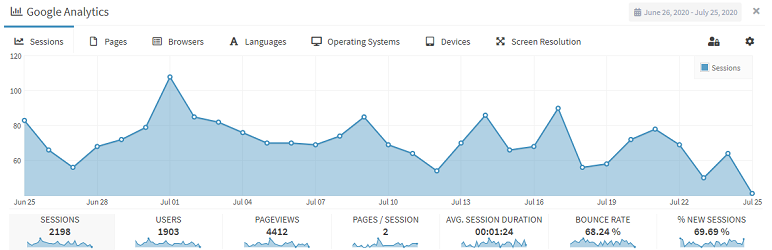
Adds a full width Google Analytics dashboard widget for WordPress admin interface, and inserts latest Google Analytics (GA4) tracking code to all your pages.
Check a fully working demo, including all Google Analytics by Lara free and premium features at : Google Analytics Dashboard Widget.
- Easy To Setup, with Express Setup you’ll be up and running in no time.
- Full width admin widget, with beautiful graphs.
- eCommerce graphs for WooCommerce.
- Quick Overview, full access to the following important Google Analytics metrics, for the last 30 days :
- Active Users
- New Users
- Sessions
- Screen Page Views
- Event Count
- Average Engagement Time
- Bounce Rate
- Easy Access to the following GA4 visitors data streams:
- Most visited pages.
- Browsers.
- Languages.
- Operating Systems.
- Device Types
- Screen Resolutions.
Want more ?! .. There’s a lot more!
Check the Pro/Premium features:
By buying the Premium version, You’ll get access to all these amazing features :
- 12 months of free updates and support.
- Multisite Multi-Network enabled : Every blog/site in your network can has its own analytics tracking code and dashboard widget.
- Permissions : Easily control which data is viwed by your blog admins and users (also compatible with Multisite Multi-Network).
- Lock Settings : Prevent users from changing the widget settings or viewing other Google analytics profiles.
- eCommerce graphs : More customized earnings graphs options, for WooCommerce.
- Check any date range, not just the last 30 days.
- Access to all the following Google Analytics GA4 metrics :
- Keywords ( provided by Google Search Console).
- Real Time site visitors.
- Traffic sources.
- Visitors Countries.
- Operating Systems versions (Windows 7, Windows 8 .. etc.).
- Device Types and brands (Samsung, Apple .. etc.).
To get the Premium version, check the Go Premium tab in the widget.






