
Motoki Spacing Controller

Motoki Spacing Controller

توسط

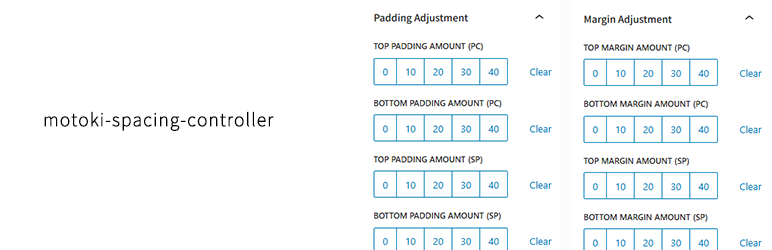
Motoki Spacing Controller allows you to:
* Adjust top/bottom padding and margin per block
* Apply styles separately for PC and smartphone
* Set spacing values via intuitive block sidebar controls
* No need for custom CSS – just click and go

Useful for:
– Designers who want precise control over vertical spacing
– Responsive web development
– Consistent layout across devices

This plugin adds spacing-related class names like pc-pt-10, sp-mb-20, etc., which are applied instantly to your blocks.


  1. Upload the plugin files to the /wp-content/plugins/motoki-spacing-controller/ directory, or install the plugin through the WordPress plugins screen directly.
  2. Activate the plugin through the “Plugins” screen in WordPress.
  3. Edit any block and open the sidebar. You will see “Padding Adjustment” and “Margin Adjustment” panels.

سوالات متداول

Will this affect my theme’s layout?

No. It only adds utility classes and will not override your theme unless there’s a conflict in class naming.

Can I customize the spacing values?

Not yet. Version 1.0 provides fixed values (0, 10, 20, 30, 40). Future versions may add customization options.

تصویری برای این آیتم موجود نیست.
نظری برای این آیتم موجود نیست.
0 0 رای ها
امتیازدهی
اشتراک در
اطلاع از
0 نظرات
قدیمی‌ترین
تازه‌ترین بیشترین رأی
نسخه حجم فایل SHA256 تغییرات دانلود
1.0.0 4 کیلوبایت -
دانلود
×
بدون امتیاز

قیمت:

رایگان

نگارش

1.0.0

آخرین انتشار

22 اردیبهشت 1405

آخرین بروزرسانی

3 ماه پیش

نصب های فعال

100+

نگارش وردپرس

وردپرس 6.0+

تست شده از نسخه

وردپرس 6.8.5

نگارش PHP

PHP 7.4+

نسخه ها

1 نسخه


