
Post Type Switcher

Post Type Switcher

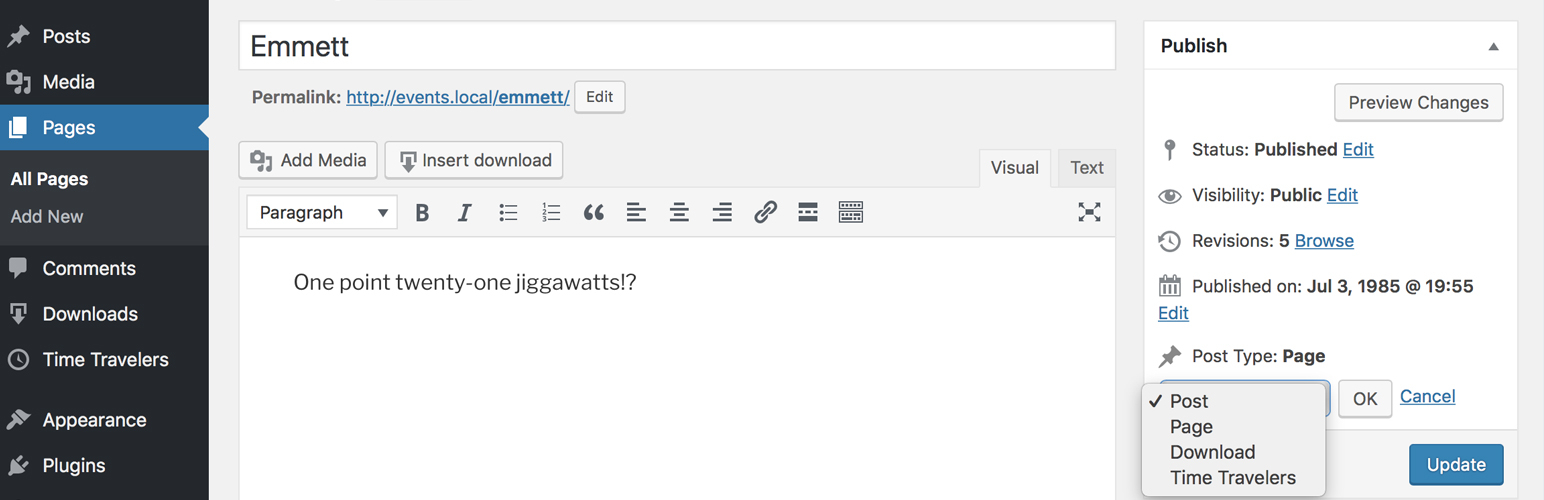
This plugin adds a simple post-type drop-down to the post editor interface, allowing you to reassign any post to a new post type. It allows you to switch post’s type while editing your post.

Supported Types

The plugin can convert nearly every combination of posts, pages, and even custom post types:

  • Page to Post
  • Post to Page
  • Post to Custom
  • Custom to Custom

As of 3.0.0, support for switching to or from Attachments was removed. This may come back in a subsequent version.

Invisible post types, such as revisions, menus, etc., are purposely excluded. But, if you need to access invisible post types, you can adjust the boundaries using the ‘pts_post_type_filter’ filter.

Bulk Editing

With bulk editing (thanks to Matthew Gerring) you can select all the posts in a certain type and convert them to a new type with one quick action.

Block Editor

With block-editor (aka Gutenberg) support (thanks to Daniel Bachhuber) you can switch between post-types that use either the Block Editor and the Classic one, without losing any of your embedded content.

Installation

  1. In your WordPress Dashboard go to “Plugins” -> “Add Plugin”.
  2. Search for “Post Type Switcher”.
  3. Install the plugin by pressing the “Install” button.
  4. Activate the plugin by pressing the “Activate” button.
  5. From the post edit screen, above the “Publish” button is the “Post Type” interface.
  6. Change post types as needed.

Minimum Requirements

  • WordPress version 5.0 or greater.
  • PHP version 7.0.0 or greater.
  • MySQL version 5.7 or greater.

Recommended Requirements

  • Latest WordPress version.
  • PHP version 8.0 or greater.
  • MySQL version 8.0 or greater, or MariaDB 10.5 or greater.

سوالات متداول

Why would I need this?

You need to selectively change a posts type from one to another.

Does this ruin my taxonomy associations?

It should not. This plugin only changes the ‘post_type’ property of a post.

Does this ruin block-editor content?

It should not. Be careful when editing HTML content while switching between editor types!

Will this delete my content?

No. This plugin does not include any code capable of deleting anything.

Plugin conflicts are not unheard of and can be difficult to troubleshoot.

If you’re worried, backup your database and deactivate all other plugins before using this tool.

If you’re still worried, ask for help in the WordPress.org support forums.

×
نظری برای این آیتم موجود نیست.
0 0 رای ها
امتیازدهی
اشتراک در
اطلاع از
0 نظرات
قدیمی‌ترین
تازه‌ترین بیشترین رأی
هیچ نسخه‌ای برای این آیتم موجود نیست.
★★★★★
★★★★★
4.7 /5 (253 نظر)

قیمت:

رایگان

نگارش

آخرین انتشار

9 اردیبهشت 1405

آخرین بروزرسانی

4 ماه پیش

نصب های فعال

200,000+

نگارش وردپرس

وردپرس 6.2+

تست شده از نسخه

وردپرس 6.9.4

نگارش PHP

PHP 8.0+

نسخه ها

0 نسخه




