
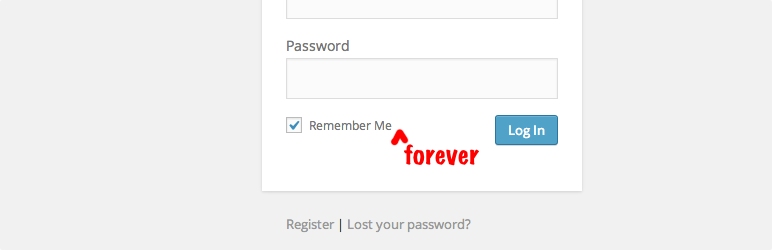
Remember Me Controls

Remember Me Controls

توسط

Take control of the “Remember Me” login feature for WordPress by having it enabled by default, customize how long users are remembered, or disable this built-in feature by default.

For those unfamiliar, “Remember Me” is a checkbox present when logging into WordPress. If checked, WordPress will remember the login session for 14 days. If unchecked, the login session will be remembered for only 2 days. Once a login session expires, WordPress will require you to log in again if you wish to continue using the admin section of the site.

This plugin provides three primary controls over the behavior of the “Remember Me” feature:

  • Automatically check “Remember Me” : The ability to have the “Remember Me” checkbox automatically checked when the login form is loaded (it isn’t checked by default).
  • Customize the duration of the “Remember Me” : The ability to customize how long WordPress will remember a login session when “Remember Me” is checked, either forever or a customizable number of hours.
  • Disable “Remember Me” : The ability to completely disable the feature, preventing the checkbox from appearing and restricting all login sessions to 2 days.

NOTE: WordPress remembers who you are based on cookies stored in your web browser. If you use a different web browser, clear your cookies, use a browser on a different machine, or uninstall/reinstall (and possibly even just restarting) your browser then you will have to log in again since WordPress will not be able to locate the cookies needed to identify you.

Compatibility

Other than the plugins listed below, compatibility has not been tested or attempted for any other third-party plugins that provide their own login widgets or login handling.

Special handling has been added to provide compatibility with the following plugins:

Links: Plugin Homepage | Plugin Directory Page | GitHub | Author Homepage

  1. Whether installing or updating, whether this plugin or any other, it is always advisable to back-up your data before starting
  2. Install via the built-in WordPress plugin installer. Or install the plugin code inside the plugins directory for your site (typically /wp-content/plugins/).
  3. Activate the plugin through the ‘Plugins’ admin menu in WordPress
  4. Go to “Settings” -> “Remember Me” and configure the settings

سوالات متداول

How long does WordPress usually keep me logged in?

By default, if you log in without “Remember Me” checked, WordPress keeps you logged in for up to 2 days. If you check “Remember Me” (without this plugin active), WordPress keeps you logged in for up to 14 days.

Why am I being asked to log in again even though I’ve configured the plugin to remember me forever (or an otherwise long enough duration that hasn’t been met yet)?

WordPress remembers who you are based on cookies stored in your web browser. If you use a different web browser, clear your cookies, use a browser on a different machine, the site owner invalidates all existing login sessions, or you uninstall/reinstall (and possibly even just restart) your browser then you will have to log in again since WordPress will not be able to locate the cookies needed to identify you.

Also, if you changed the remember me duration but hadn’t logged out after having done so, that particular login session would still be affected by the default (or previously configured) duration.

How can I set the session duration to less than an hour?

You can’t (and probably shouldn’t). With a session length of less than an hour you risk timing out users too quickly.

Do changes to the remember me duration take effect for all current login sessions?

No. The duration for which a login cookie is valid is defined within the cookie when it gets created (which is when you log in). Changing the setting for the remember me duration will only affect cookies created thereafter. You can log out and then log back in if you want the newly configured remember me duration to apply to your session. More precisely, the changes take effect for all new logins, which can happen after a preexisting login session expires, the user logs out, or the user’s cookies are cleared in their browser (manually or automatically).

Why are some of the plugin settings disabled?

Certain settings being enabled may disable other settings that get superceded by the enabled setting. For instance, if the “Never remember?” setting is enabled, then all other settings are disabled since they wouldn’t apply. The onscreen help text for each setting indicates what other settings are relatedly affected.

How can I make the plugin configuration changes I’ve made take effect immediately?

As explained in the previous FAQ entry, changes to the plugin’s settings only take effect the next time a user logs in. Existing login sessions will abide by the remember me duration configured at the time they logged into their current session.

The login cookies for a user session can become invalidated by the visitor by logging out or clearing their cookies.

Here are some options to force all active login sessions to abide by the current login session duration:
* Manually refresh your site’s authentication keys and salts.
* Use WP-CLI to regenerate salts.
* Use the plugin WPForce Logout (to force session logouts) or Salt Shaker (to regenerate salts). Note: Plugins are merely suggestions and not necessarily recommendations.

What plugins are this plugin compatible with?

Special handling has been added to provide compatibility with the following plugins:

Is this plugin GDPR-compliant?

Yes. This plugin does not collect, store, or disseminate any information from any users or site visitors.

Does this plugin include unit tests?

Yes. The tests are not packaged in the release .zip file or included in plugins.svn.wordpress.org, but can be found in the plugin’s GitHub repository.

×
نظری برای این آیتم موجود نیست.
0 0 رای ها
امتیازدهی
اشتراک در
اطلاع از
0 نظرات
قدیمی‌ترین
تازه‌ترین بیشترین رأی
نسخه حجم فایل SHA256 تغییرات دانلود
2.1 46 کیلوبایت -
دانلود
×
★★★★★
★★★★★
4.3 /5 (7 نظر)

قیمت:

رایگان

نگارش

2.1

آخرین انتشار

12 اردیبهشت 1405

آخرین بروزرسانی

4 ماه پیش

نصب های فعال

4,000+

نگارش وردپرس

وردپرس 5.5+

تست شده از نسخه

وردپرس 6.6.5

نگارش PHP

-

نسخه ها

1 نسخه




