
Responsive Mortgage Calculator

Responsive Mortgage Calculator

The Responsive Mortgage Calculator is a jQuery widget and shortcode that’s designed to fit easily into any theme, on any device, at any size. Just what every “Real Estate Agent on the go” needs. This plugin is, optionally, relying on www.mlcalc.com/mortgage-calculator/ service to show mortgage amortization and chart.

Features

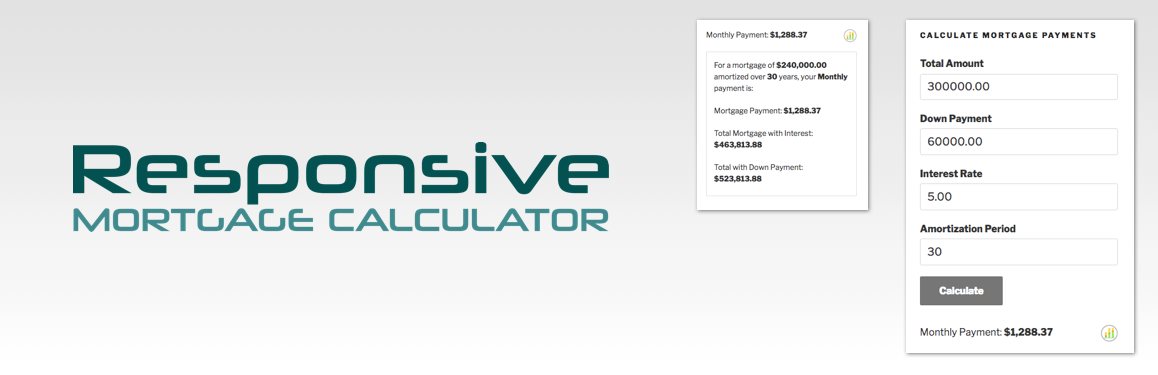
The mortgage calculator allows your website visitors to estimate their mortgage payments by entering:

  • the total cost of the home,
  • a down payment amount,
  • an interest rate (fixed rate),
  • the amortization period (mortgage term),
  • and they can select a payment period, either monthly, bi-weekly, or weekly,
  • nice popup summary with chart and amortization schedule.

The mortgage payment result is displayed below the form – very simply and very easy to follow. For the savvy user, a click on the information icon reveals more mortgage details…

Redesign It

There are settings to adjust the styling, a light and a dark theme, or you can remove the styling entirely and use your theme’s styling. The HTML is built with plenty of classes, so it’s easy to override the included stylesheet with your own CSS.

Plenty of Options

  • Set the interest rate compounding period for your region.
  • Format currencies how you want with your own symbol, ISO code and number format.
  • Hide the down payment field.
  • Set a default interest rate.
  • Accept amortization period in months or years.
  • Set a fixed payment period.
  • Set available mortgage payment period options.
  • Rename the input labels.
  • Add your own CSS classes.

Shortcode Attributes

Use the shortcode on different pages with different field names by using shortcode attributes. They’re pretty obvious, but here’s an example:

[mortgagecalculator totalamount="Mortgage Amount"]

or use the first letter of the original labels:

[rmc ta="Mortgage Amount"]

Set input values using attributes for total amount, down payment, interest rate, and mortgage term the long way:

[mortgagecalculator total_amount_value="$250,000" down_payment_value="$50,000" interest_rate_value="3.49%" amortization_period_value="15 years"]

or using the short versions:

[rmc tav="$250,000" dpv="$50,000" irv="3.49%" apv="15 years"]

Disclaimer

The Responsive Mortgage Calculator is for demonstration purposes only and may not reflect actual numbers for your mortgage.

Install this plugin just like any other…

  1. Upload the plugin folder responsive-mortgage-calculator.php to the /wp-content/plugins/ directory
  2. Activate the plugin through the ‘Plugins’ menu in WordPress

Widget Installation

  1. Access the Widgets page under the Appearance menu.
  2. Drag the Responsive Mortgage Calculator into the Widget display area of your choice.
  3. If you want, change the title and save it.

Shortcode Usage

You can insert the mortgage calculator into a page or post using the short code [mortgagecalculator] or [rmc].

Set the Compounding Period

The mortgage calculator has a default compounding period that is semi-annual. Visit the settings page under Settings > Resp Mortgage Calculator and change the setting ‘Compounding period for the mortgage interest’ to the correct period for your region.

سوالات متداول

On submission, the page just reloads and the mortgage calculator shows no results

This is likely a problem with the JavaScript file not being loaded, and seems to occur when using the shortcode with a visual editor plugin, like Visual Composer. This will also prevent the CSS file from loading.

First, try editing the page with the shortcode. Switch from the visual editor to plain text editing, add the shortcode in plain text, and save it. Check the mortgage calculator to see if it working. If that didn’t work, you can…

Solve this problem by manually loading the scripts and styles. In the plugin folder, open the Extras folder, then open the file called manually_load_scripts.php. Copy the contents to your theme’s functions.php file. Even better, copy it to the functions.php file of a child theme. Change the page slug in the if conditional from your-page-slug-here to the actual page slug you’re using for the shortcode. Test it.

The calculated payment is off by a few dollars

The mortgage calculator calculates interest monthly by default, but you can change this on the settings page. Go to Settings > Resp Mortgage Calculator and change the setting ‘Compounding Period’ to the correct period for your region.

When I put two mortgage calculators on the same page, it doesn’t work

This is a known issue. In the current version of the calculator, there can only be one instance of Responsive Mortgage Calculator on a page. This may change at some point in the future.

×
نظری برای این آیتم موجود نیست.
0 0 رای ها
امتیازدهی
اشتراک در
اطلاع از
0 نظرات
قدیمی‌ترین
تازه‌ترین بیشترین رأی
نسخه حجم فایل SHA256 تغییرات دانلود
2.6.0 55 کیلوبایت -
دانلود
×
★★★★★
★★★★★
4.4 /5 (21 نظر)

قیمت:

رایگان

نگارش

2.6.0

آخرین انتشار

11 اردیبهشت 1405

آخرین بروزرسانی

4 ماه پیش

نصب های فعال

7,000+

نگارش وردپرس

وردپرس 3.0.1+

تست شده از نسخه

وردپرس 6.7.5

نگارش PHP

-

نسخه ها

1 نسخه




