
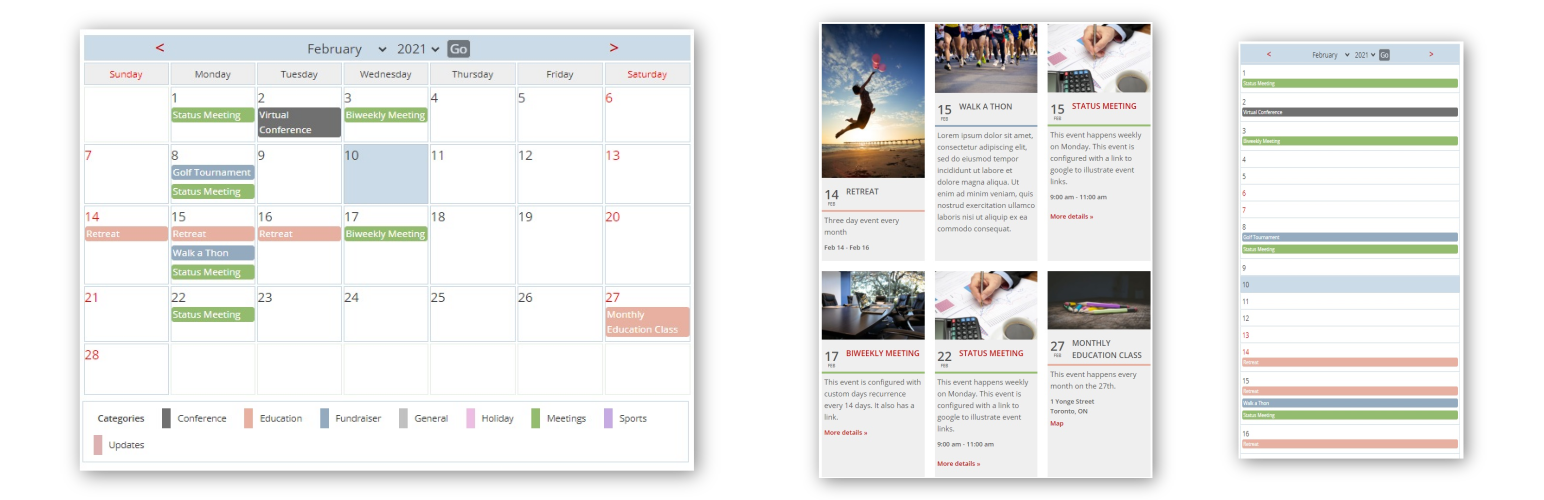

Manage and display your events in a responsive calendar with multiple views, widgets and shortcodes. Color-coded categories and recurrence support. The premium Bonus Add-Ons supplements the plugin with additional themes, customizer support, ICS export, front end submit, CSV import/export and custom fields.
Click here for helpful CSS snippets.
Click here to learn about Bonus Add-Ons.
Features
Post/page displays:
- Standard monthly calendar grid that toggles to a list view
- Category filter in the monthly calendar grid
- Responsive 3-column event listing
- Mini-calendar view for compact displays
- Weekly calendar grid
- Today’s events list
- Upcoming events list
Widgets:
- Featured event
- Today’s events list
- Upcoming events list
- Mini Calendar
Categories:
- Color-coded categories
- Option to display category color as background or foreground on the standard calendar grid
- Displays may be filtered by category list
- Optional sort categories alphabetically
- Live category filter on the full calendar
Other features:
- Mouse-over details for each event
- Choice of popup, columns or expanded display of lists
- Events can display their author (optional)
- Add custom CSS styles or just use the defaults
- Display upcoming events in your MailPoet newsletters
- Display week number in the full calendar
- Filters to allow additional formatting
- Optional responsive display for the full size calendar
- Optional drop down boxes to quickly change month and year
- Front end quick links to edit/delete events for logged in admins
Enter and display for each event:
- title,
- description,
- location,
- link to Google map,
- event category,
- status,
- link,
- event start/end date
- event start/end time
- event recurrence details
- event hiding details
- event image
- custom fields (premium)
Schedule a wide variety of recurring events.
- Events can repeat on a daily (set numbers of days), weekly, monthly (by date), monthly (by day of week) or yearly basis
- Repeats can occur indefinitely or a limited number of times
- Events can span more than one day
Hide all events for specific days:
- Hide repeating event for a single day such as a holiday
- Hide full days of events that span more than one day
- Substitute new title to replace hidden events
- Select override based on category
Easy to use events manager in admin dashboard
- Comprehensive settings panel for admin
- User groups other than admin can be permitted to manage events
- Authors can be restricted to editing their own events only
BONUS FEATURES AVAILABLE WITH DONATION
- Premium themes
- Live theme customizer
- ICS export
- Front End submit form with captcha
- Front End edit/delete events
- Import/Export events via CSV
- Custom fields






