
Text Case Converter

Text Case Converter

توسط

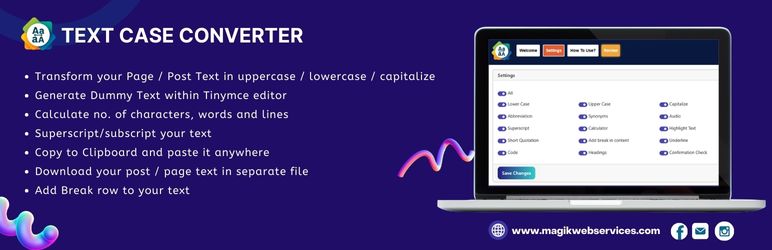
Text Case Converter is an open source WordPress plugin using which you can change your page or post text into uppercase or lowercase or capitalize or sentence case or invert case etc.. Besides this, you can also generate dummy text in your post and can count the no. of characters, words and lines in post text.

Watch this video to see how the plugin works:

Key features of this plugin include

  • Transform your Page / Post Text in uppercase / lowercase / capitalize.
  • Generate Dummy Text within TinyMCE editor.
  • Calculate no. of characters, words and paragraphs.
  • Superscript / subscript your text.
  • Copy to Clipboard and paste it anywhere.
  • Download your post / page text in separate file.
  • Add Break row to your text.
  • Clean all text.
  • Highlight text.
  • Quotation marks around the text.
  • HTML5 tag for addresses.
  • Abbreviation tag with title attribute for text.
  • Tooltip and synonyms features for text.
  • New buttons for audio and video insert.
  • Use code tag to define some text as computer code.
  • Underline text with colors
  • Use tel tag for any phone number for SEO
  • Use email tag for any email you have on page
  • Modern SweetAlert notifications for better user experience
  • NEW: Professional mce-ico icons for all buttons
  • NEW: Enhanced Elementor compatibility with dynamic icon injection
  • NEW: Improved visual design with consistent icon styling
  • NEW: Better performance and caching optimization

Multiple Languages

This plugin is translated into multiple languages which includes:

Arabic
Bengali
Chinese Simplified
Chinese Traditional
English
French
German
Hindi
Italian
Japanese
Portuguese (Brazil)
Russian
Spanish

The plugin is simple to install:

  • Download text-case-converter.2.0.zip
  • Unzip
  • Upload the plugin directory to your /wp-content/plugins directory
  • Go to the plugin menu page and activate the plugin.

سوالات متداول

How to use Text Case Converter plugin?
  1. Activate the plugin through the ‘Plugins’ menu in WordPress.
  2. Then go to new post or page and enable classic editor, you will see extra buttons to use new features.
  3. You can also access plugin settings from Settings > Text Case Converter in your WordPress admin.
How to use with different editors?

Classic Editor:
– Create or edit a post with Classic Editor enabled
– All Text Case Converter buttons will appear in the toolbar with professional icons
– Select text and use any conversion feature (Uppercase, Lowercase, SMS, Email, etc.)

Gutenberg Block Editor:
– Add a “Classic” block to your post/page
– The Text Case Converter buttons will appear in the Classic block toolbar
– Select text and use any conversion feature
– Note: Buttons only appear in Classic blocks, not native Gutenberg blocks

Elementor Builder:
– Add a “Text Editor” widget to your page
– The plugin buttons will appear in the Text Editor widget toolbar with enhanced compatibility
– All features work as expected with dynamic icon injection
– Settings accessible via WordPress Admin Settings Text Case Converter

What new features are available in version 2.0?

Visual Improvements:
Professional Icons: All buttons now use consistent mce-ico icons instead of text labels
Enhanced Design: Better visual consistency across all editor types
Improved UX: Cleaner, more professional appearance

Technical Improvements:
Elementor Compatibility: Enhanced support with dynamic CSS injection
Performance: Optimized loading and caching
Code Quality: Improved JavaScript and CSS structure

Existing Features:
SMS Links: Create clickable SMS links with phone numbers
Email Links: Create clickable email links
Telephone Links: Create clickable phone number links
Text Case Conversion: Uppercase, Lowercase, Capitalize, Sentence case, Alternate case
Formatting Tools: Headings, Subscript, Superscript, Underline, Code
Interactive Features: Tooltips, Audio/Video tags, Calculator, Synonyms
Utility Tools: Clean editor, Copy to clipboard, Download text

What is the benefit of using this plugin?

User can easily change page or post text into uppercase or lowercase or capitalize or sentence case or invert case etc.. The plugin also provides modern UI improvements, professional icon design, and better caching for optimal performance. Version 2.0 brings enhanced compatibility with Elementor and improved visual design.

Is this plugin compatible with the latest WordPress version?

Yes, this plugin is regularly updated and tested with the latest WordPress versions for maximum compatibility. Version 2.0 includes enhanced compatibility with Elementor and improved performance.

×
نظری برای این آیتم موجود نیست.
0 0 رای ها
امتیازدهی
اشتراک در
اطلاع از
0 نظرات
قدیمی‌ترین
تازه‌ترین بیشترین رأی
هیچ نسخه‌ای برای این آیتم موجود نیست.
★★★★★
★★★★★
5.0 /5 (3 نظر)

قیمت:

رایگان

نگارش

آخرین انتشار

17 اردیبهشت 1405

آخرین بروزرسانی

3 ماه پیش

نصب های فعال

300+

نگارش وردپرس

وردپرس 6.3+

تست شده از نسخه

وردپرس 6.8.5

نگارش PHP

-

نسخه ها

0 نسخه




